A VRChat OSC tool to move a player in the direction of a stretched Physbone.
For leashes, tails, or even hand holding!
Download & Setup
Download the latest version of OSCLeash from releases.
Versions avalible
Windows
| Type |
File Name |
Features |
| Installer |
OSCLeash.msi |
Installs locally, adds desktop and startmenu icon |
| Standalone Pyinstaller |
OSCLeash-pyinstaller.exe |
Runs from where ever you place the exe |
| Standalone Nuitka |
OSCLeash-Nuitka.exe |
Runs from where ever you place the exe, soposed performance increase |
Linux
| Type |
File Name |
GUI/CLI launch? |
Features |
| Standalone AppImage |
OSCLeash.appimage |
CLI Launcher only |
Standalone Appimage runs in place |
| Standalone Pyinstaller |
OSCLeash-pyinstaller |
CLI Launcher only |
Runs from where ever you place the binary |
| Standalone Nuitka |
OSCLeash-Nuitka |
CLI Launcher only |
Runs from where ever you place the binary, soposed performance increase |
| AUR |
OSCLeash and OSCLeash-nuitka @ AUR |
GUI and CLI Launchers |
Installs to an arch system, makes a XDG compatible launch file |
Unity Setup
This app does not provide a model for a Leash at this time.
Setup Steps (Click the Arrow!)
- Grab the prefab
(OSCLeash.prefab) from releases and drop it into your Unity project.
- Place the prefab on the root of your model. (NOT a child of armature) Don’t break prefab!
- Select the
Leash Physbone object and assign the Root Transform of the Physbone to the first bone of your leash.
- Select the
Compass object and assign the source of the Position constraint to the first bone of your leash.
- You can find
Aim Needle as a child of compass. Assign the source of the Aim Constraint to the last bone of your leash.
- (Optional) You can animate the compass object off for remote users using IsLocal.
- (Optional) Cross Quest/PC support? You’ll need to sync the Physbone’s network ID. See FAQ.
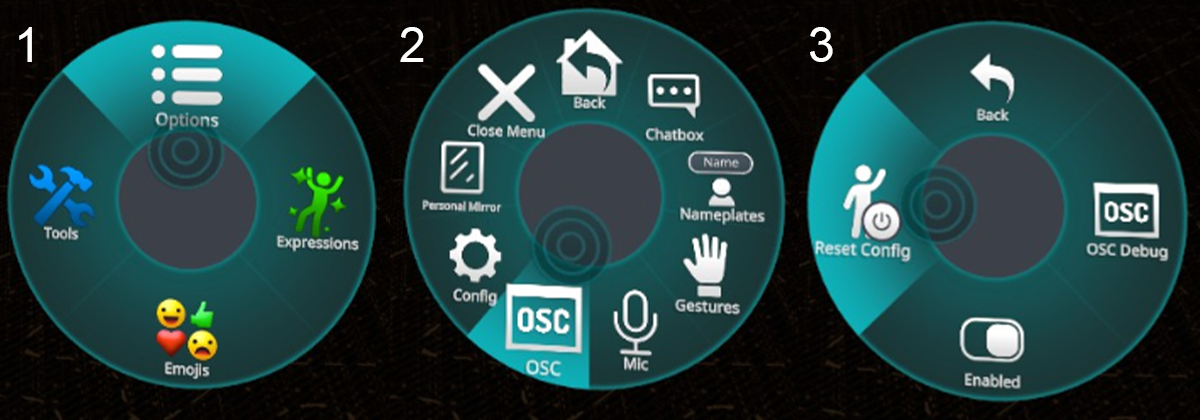
- Enable OSC in VRChat settings. (Or reset OSC if you updated an avatar!) ~ Tutorial
- Run the OSCLeash app and get pulled about!
- Visit Config and fine tune settings for your taste
If you’re having issues, make sure to see the FAQ section.
If all else fails, feel free to reach out in the #OSC-Talkin channel in my Discord
Config
After running OSCleash at least once, a Config.json file will be generated.
This configuration file will be located at %LocalAppData%\Programs\OSCLeash\Config.json (Windows), $XDG_CONFIG_HOME/OSCLeash/Config.json (Linux), or $HOME/.config/OSCLeash/Config.json (Linux, fallback). The OSCLEASH_CONFIG_PATH environment variable can be used to override the default config location.
You can open the Config.json file in your favorite text editor to fine tune your OSCLeash.
Table of Configation settings
| Value |
Info |
Default |
| IP |
Address to send OSC data to |
127.0.0.1 |
| ListeningPort |
Port to listen for OSC data on |
9001 |
| Sending port |
Port to send OSC data to |
9000 |
| RunDeadzone |
Minimum Stretch % to cause running |
0.70 |
| WalkDeadzone |
Minimum Stretch % to start walking |
0.15 |
| StrengthMultiplier |
Multiplies speed values but they can’t go above (1.0) |
1.2 |
| UpDownCompensation |
% of compensation to apply for Up/Down angles |
1.0 |
| UpDownDeadzone |
Stops movement if pull angle is above/below this. 1.0 Disables |
0.5 |
| TurningEnabled |
Enable turning functionality |
false |
| TurningMultiplier |
Adjust turning speed |
0.80 |
| TurningDeadzone |
Minimum Stretch % to start turning |
0.15 |
| TurningGoal |
Goal degree range for turning. (degrees, 0-144) (0° to 144°) |
90 |
| ActiveDelay |
Delay in seconds between OSC messages while active |
0.02 |
| InactiveDelay |
Delay in seconds for OSCLeash while not in use |
0.5 |
| Logging |
Logging for Directional compass inputs |
false |
| XboxJoystickMovement |
Alt movement method for an old bug. Removing eventually |
false |
| UseOSCQuery |
Enables OSCQuery |
false |
| PhysboneParameters |
A list of Physbones that are leashes |
see below |
| DirectionalParameters |
A list of contacts to use for direction calculation |
see below |
Default Config.json
{
        "IP": "127.0.0.1",
        "ListeningPort": 9001,
        "SendingPort": 9000,
        "RunDeadzone": 0.70,
        "WalkDeadzone": 0.15,
        "StrengthMultiplier": 1.2,
        "UpDownCompensation": 1.0,
        "UpDownDeadzone": 0.5,
        "TurningEnabled": false,
        "TurningMultiplier": 0.80,
        "TurningDeadzone": 0.15,
        "TurningGoal": 90,
        "ActiveDelay": 0.02,
        "InactiveDelay": 0.5,
        "Logging": false,
        "XboxJoystickMovement": false,
        "UseOSCQuery": false,

        "PhysboneParameters":
        [
                "Leash"
        ],
        "DirectionalParameters":
        {
                "Z_Positive_Param": "Leash_Z+",
                "Z_Negative_Param": "Leash_Z-",
                "X_Positive_Param": "Leash_X+",
                "X_Negative_Param": "Leash_X-",
                "Y_Positive_Param": "Leash_Y+",
                "Y_Negative_Param": "Leash_Y-"
        }
}
Physbone Parameters
This is a list of all the Physbones you’re using with OSCLeash.
        "PhysboneParameters":
        [
            "Leash",
            "Leash2",
            "Leash3"
        ],
OSCLeash listens for the _IsGrabbed and _Stretch parameters for every listed leash.
Multiple Leashes
This requires an understanding of Physbones Parameters, Animations, and Constraints.
- Add a new source to
Compass and Aim Needle for each extra leash. 0 Weight by default
- Depending on which leash
_IsGrabbed, animate the weights to match the Grabbed leash.
Turning Functionality
⚠️ Motion sickness warning ⚠️
If you want to enable this feature, set TurningEnabled to True.
Currently Supports North, East, South, & West
If you had a leash up front and you want to turn to match the direction it’s pulled from (EG: a Collar with the leash on the front) Set set the parameter on your Leash Physbone and config to Leash_North.
Config File
        "PhysboneParameters":
        [
            "Leash_North"
        ],
We parse the direction to control turning so "Tail_South" would work.
Whenever this leash is grabbed and pulled past the deadzone it will begin to turn.
It will continue to turn until it is greater than the TurningDeadzone value.
Nerd Stuff
Here’s the simplified logic of the system.
if LeashDirection == "North" and Z_Positive < TurningGoal:
    TurningSpeed = ((X_Negative - X_Positive) * LeashStretch * TurningMultiplier)
Extra stuff for nerds!
How OSCLeash works
Step 1: Get Leash Physbone parameters
We receive the Leash_Stretch and Leash_Grabbed parameters.
If Leash_Grabbed becomes true, we begin reading Leash_Stretch
We’ll use these values in this example:
Leash_IsGrabbed = True
Leash_Stretch = $0.95$

4 Contacts (Blue) surround a object with an aim constraint and a contact at the tip. (Yellow)
Based on where the constraint is aimed, it will give us 4 values.
If it was pointing South-South-West, we would get:
Leash_Z+ = $0.0$
Leash_Z- = $0.75$
Leash_X+ = $0.0$
Leash_X- = $0.25$
Step 3: Math
Math is fun. Add the negative and positive contacts & multiply by the stretch value.
(Z_Positive - Z_Negative) * Leash_Stretch = Vertical
(X_Positive - X_Negative) * Leash_Stretch = Horizontal
So our calculation for speed output would look like:
$(0.0 - 0.75) * 0.95 = -0.7125$ = Veritcal
$(0.0 - 0.25) * 0.95 = -0.2375$ = Horizontal
Step 4: Outputs
If either value is above the walking deadzone (default 0.15) we start outputting them instead of 0.
If either value is above the running deadzone (0.7) we tell the player to run (x2 speed)
All movement values are relative to the VRC world’s movement speed limits.
So we’d be moving at $142.5$% speed south and $47.5$% speed to the West.
If the values are below the deadzones or _IsGrabbed is false, send 0s for the OSC values once to stop movement.
FAQ
Click to Expand
Q: OSCLeash.exe is removed by my antivirus.
A1: This is a false positive I can’t really fix. You’ll need to add an exclusion.
A2: Try out the MSI version if you’re having trouble with the EXE or build it yourself.
Q: OSCLeash always says Started, awaiting input
A1: Manually Reset OSC by deleting the OSC and OSC.bak folders at C:\Users\(Your username)\AppData\LocalLow\VRChat\VRChat
A2: Did you do avatar setup correctly? Make sure your leash physbone matches your config.
A3: This could potentially be a firewall issue, but before that, double check your avatar, please.
Q: Missing scripts on prefab
A1: Your VRC SDK is likely out of date or your project has errors. Please update or fix.
A2: If using the Modular Avatar prefab, you’ll need to have that installed too.
Q: OSCLeash says grabbed but I don’t get moved
A1: This can happen if your leash physbone does not have any stretch.
A2: Make sure self interaction is enabled, it’s needed for the direction calculation.
Q: The direction OSCLeash pulls is not accurate
A1: Is your physbone too angle limited or short? If it can’t move it can’t get an accurate location.
A2: If your scaling up very large, scale down the Compass object ~ contacts have a max size.
Q: Quest Support
A1: You’ll need to sync the network IDs of your Leash physbone between Quest & PC.
You can use VRC’s Network ID Utility or the ID Assigner tool made by the community.
A2: The OSCLeash app needs to be run on a PC. (OSC is over the network though)
Q: How can I run OSCLeash with my other OSC apps
A1: Enable OSCQuery by setting useOSCQuery to true in the config.
A2: Try out a OSC Router, like OSC Switch.
Q: My Question/Issue isn’t answered above
A: Discord or Git Issue
Future Plans/Goals
- Simple dOSC app version
- Performant C# Rewrite
- Turns out python isn’t great for really fast stuff?
- Maybe even C++ if masochistic enough.
OSCQuery Support (When whitelisting is fixed)
- Whilelisting still isn’t fixed but meh
- Anchoring leash to a point in world space when posed.
- Using a player Contact Tracker to follow automatically.
- Y axis movement via an OVRAS API
Running from Source
For those that want to, you can run OSCLeash without an installer or exe.
- Clone the repo
CD into the directory- Run
pip install -r requirements.txt
- Run
OSCLeash.py
Credits & Liscenses
- App Rope Icon | Game-icons.net under CC by 3.0
- @ALeonic is responsible for a majority of v2 (Threading is scary!)
- @FrostbyteVR walked me through the proccess of making v1
- Someone else did this but it was a closed source executable


评论