Compress-images

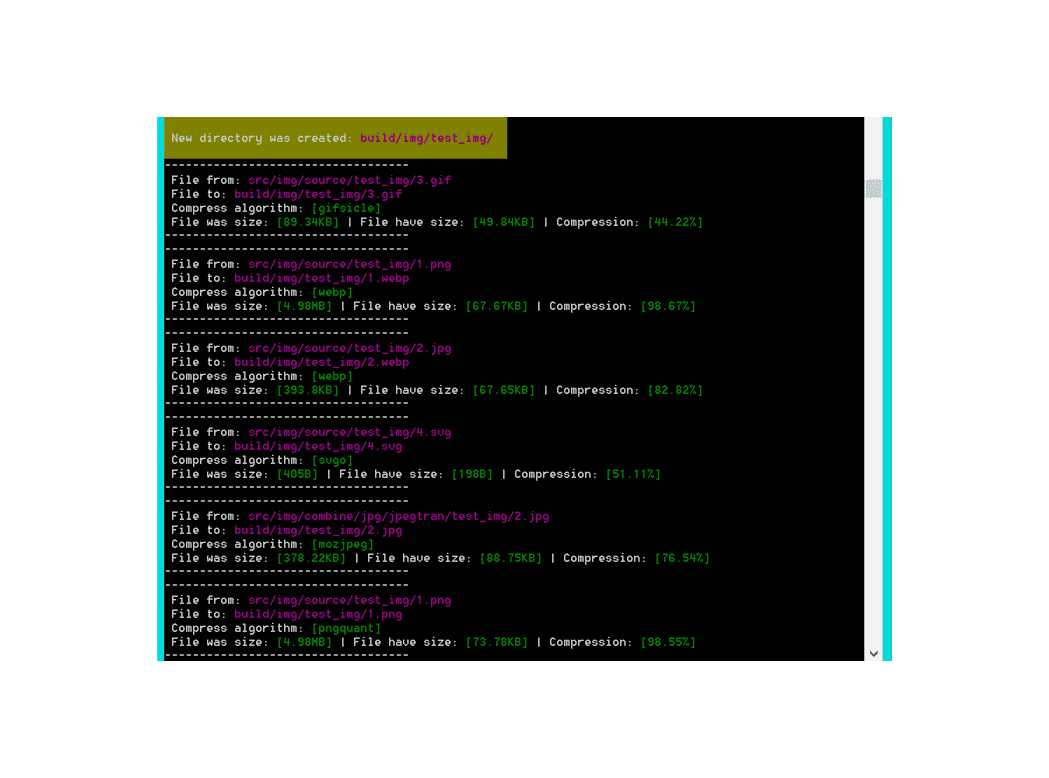
compress-images Minify size your images. Image compression with extension: jpg/jpeg, svg, png, gif.
Minify size your images. Image compression with extension: jpg/jpeg, svg, png, gif.
You can also use:
Features
You can use different algorithms and methods for compressing images with many options.
- For JPG:
jpegtran, mozjpeg, webp, guetzli, jpegRecompress, jpegoptim, tinify;
- For PNG:
pngquant, optipng, pngout, webp, pngcrush, tinify;
- For SVG:
svgo;
- For GIF:
gifsicle, giflossy, gif2webp;
Combine compression
You can even minify images by using a combination of compression algorithms. As an example - mozjpeg + jpegoptim or jpegtran + mozjpeg or any other algorithm.
Saving error log
If you get an error, the error log will be saved. Default path ./log/compress-images.
Alternative configuration/algorithm for compressing images
If you get an error, alternative algorithms for compressing images can be used. As an example: you want to compress images in jpegRecompress, but you get the error Unsupported color conversion request, so an alternative algorithm to compress the images can be used, like mozjpeg.
Detect path for saving images
You can specify the path to source images folder and all images in the folder will be compressed and moved to output folder.
As an example, one of many:
    INPUT ['src/img/source/**/*.{jpg,JPG,jpeg,JPEG,gif,png,svg}']
    OUTPUT ['build/img/']
Note
You should have in your path slash: /.
If you have slash \ it may be to replaced: input.replace(/\\/g, '/');

Other useful plugins:
Get started
Install
npm install compress-images --save-dev
Examples of how to use it
Base example
https://github.com/semiromid/compress-images/tree/master/example
Example 1
const compress_images = require("compress-images"),
  INPUT_path_to_your_images,
  OUTPUT_path;

INPUT_path_to_your_images = "src/img/**/*.{jpg,JPG,jpeg,JPEG,png,svg,gif}";
OUTPUT_path = "build/img/";

compress_images(INPUT_path_to_your_images, OUTPUT_path, { compress_force: false, statistic: true, autoupdate: true }, false,
                { jpg: { engine: "mozjpeg", command: ["-quality", "60"] } },
                { png: { engine: "pngquant", command: ["--quality=20-50", "-o"] } },
                { svg: { engine: "svgo", command: "--multipass" } },
                { gif: { engine: "gifsicle", command: ["--colors", "64", "--use-col=web"] } },
  function (error, completed, statistic) {
    console.log("-------------");
    console.log(error);
    console.log(completed);
    console.log(statistic);
    console.log("-------------");
  }
);
Example 2
const compress_images = require("compress-images");
function MyFun() {
compress_images(
"src/img/**/*.{jpg,JPG,jpeg,JPEG,png,svg,gif}",
"build/img/",
{ compress_force: false, statistic: true, autoupdate: true },
false,
{ jpg: { engine: "mozjpeg", command: ["-quality", "60"] } },
{ png: { engine: "pngquant", command: ["--quality=20-50", "-o"] } },
{ svg: { engine: "svgo", command: "--multipass" } },
{
gif: { engine: "gifsicle", command: ["--colors", "64", "--use-col=web"] },
},
function (err, completed) {
if (completed === true) {
}
}
);
}
Example 3
const compress_images = require('compress-images');
compress_images(
"src/img/**/*.{jpg,JPG,jpeg,JPEG}",
"build/img/",
{ compress_force: false, statistic: true, autoupdate: true },
false,
{ jpg: { engine: "webp", command: false } },
{ png: { engine: false, command: false } },
{ svg: { engine: false, command: false } },
{ gif: { engine: false, command: false } },
function (err) {
if (err === null) {
compress_images(
"src/img/**/*.{jpg,JPG,jpeg,JPEG}",
"build/img/",
{ compress_force: false, statistic: true, autoupdate: false },
false,
{ jpg: { engine: "jpegtran", command: false } },
{ png: { engine: false, command: false } },
{ svg: { engine: false, command: false } },
{ gif: { engine: false, command: false } },
function () {}
);
} else {
console.error(err);
}
}
);
Example 4
const compress_images = require('compress-images');
compress_images(
"src/img/source/**/*.{jpg,JPG,jpeg,JPEG}",
"src/img/combination/",
{ compress_force: false, statistic: true, autoupdate: true },
false,
{
jpg: {
engine: "jpegtran",
command: ["-trim", "-progressive", "-copy", "none", "-optimize"],
},
},
{ png: { engine: false, command: false } },
{ svg: { engine: false, command: false } },
{ gif: { engine: false, command: false } },
function () {
compress_images(
"src/img/combination/**/*.{jpg,JPG,jpeg,JPEG}",
"build/img/",
{ compress_force: false, statistic: true, autoupdate: false },
false,
{ jpg: { engine: "mozjpeg", command: ["-quality", "75"] } },
{ png: { engine: false, command: false } },
{ svg: { engine: false, command: false } },
{ gif: { engine: false, command: false } },
function () {}
);
}
);
Example 5
const compress_images = require('compress-images');
compress_images('src/img/source/**/*.{jpg,JPG,jpeg,JPEG,gif,png,svg}', 'build/img/', {compress_force: false, statistic: true, autoupdate: true}, false,
{jpg: {engine: 'webp', command: false}},
{png: {engine: 'webp', command: false}},
{svg: {engine: 'svgo', command: false}},
{gif: {engine: 'gifsicle', command: ['--colors', '64', '--use-col=web']}}, function(){
compress_images('src/img/source/**/*.{jpg,JPG,jpeg,JPEG}', 'src/img/combine/', {compress_force: false, statistic: true, autoupdate: false}, false,
{jpg: {engine: 'jpegtran', command: ['-trim', '-progressive', '-copy', 'none', '-optimize']}},
{png: {engine: false, command: false}},
{svg: {engine: false, command: false}},
{gif: {engine: false, command: false}}, function(){
compress_images('src/img/combine/**/*.{jpg,JPG,jpeg,JPEG}', 'build/img/', {compress_force: false, statistic: true, autoupdate: false}, false,
{jpg: {engine: 'mozjpeg', command: ['-quality', '75']}},
{png: {engine: false, command: false}},
{svg: {engine: false, command: false}},
{gif: {engine: false, command: false}}, function(){
compress_images('src/img/source/**/*.png', 'build/img/', {compress_force: false, statistic: true, autoupdate: false}, false,
{jpg: {engine: false, command: false}},
{png: {engine: 'pngquant', command: ['--quality=30-60', '-o']}},
{svg: {engine: false, command: false}},
{gif: {engine: false, command: false}}, function(){
});
});
});
});
Example 6
Sometimes you could get errors, and then use alternative configuration “compress-images”.
As an example, one of many:
-
If you get an error from ‘jpegRecompress’, for example, the error “Unsupported color conversion request”. In this case, an alternative image compression algorithm will be used.
-
An error log will be created at path ‘./log/lib/compress-images’.
-
The algorithm ‘mozjpeg’ will attempt to be used instead.
const
compress_images = require('compress-images'),
INPUT_path_to_your_images = 'src/**/*.{jpg,JPG,jpeg,JPEG,png,svg,gif}',
OUTPUT_path = 'build/';
compress_images(INPUT_path_to_your_images, OUTPUT_path, {compress_force: false, statistic: true, autoupdate: true, pathLog: './log/lib/compress-images'}, false,
{jpg: {engine: 'jpegRecompress', command: ['--quality', 'high', '--min', '60']}},
{png: {engine: 'pngquant', command: ['--quality=20-50', '-o']}},
{svg: {engine: 'svgo', command: '--multipass'}},
{gif: {engine: 'gifsicle', command: ['--colors', '64', '--use-col=web']}}, function(err, completed){
if(err !== null){
if(err.engine === 'jpegRecompress'){
compress_images(err.input, err.output, {compress_force: false, statistic: true, autoupdate: true}, false,
{jpg: {engine: 'mozjpeg', command: ['-quality', '60']}},
{png: {engine: false, command: false}},
{svg: {engine: false, command: false}},
{gif: {engine: false, command: false}}, function(err){
if(err !== null){
}
});
}
}
});
Example 7
Compressing an image in the same folder (currently this only works with ‘pngquant’)
    const
    compress_images = require('compress-images'),
    fs = require('fs'),
    INPUT_path_to_your_images = 'src/img/**/!(*-min).png',
    OUTPUT_path = 'src/img/';

    compress_images(INPUT_path_to_your_images, OUTPUT_path, {compress_force: true, statistic: false, autoupdate: true}, false,
                                                {jpg: {engine: false, command: false}},
                                                {png: {engine: 'pngquant', command: ['--quality=20-50', '--ext=-min.png', '--force']}},
                                                {svg: {engine: false, command: false}},
                                                {gif: {engine: false, command: false}}, function(err, completed, statistic){
        if(err === null){
            fs.unlink(statistic.input, (err) => {
                if (err) throw err;
                console.log('successfully compressed and deleted '+statistic.input);
            });
        }
    });
    <picture>
        <source type="image/webp" srcset="//hostname/build/img/art/1/chat.webp">
        <img width="700" height="922" alt="test" src="//hostname/build/img/art/1/chat.jpg">
    </picture>
API
compress_images(input, output, option, globoption, enginejpg, enginepng, enginesvg, enginegif, callback)
-
input (type:string): Path to source image or images;
Example:
1. 'src/img/**/*.{jpg,JPG,jpeg,JPEG,png,svg,gif}';
2. 'src/img/**/*.jpg';
3. 'src/img/*.jpg';
4. 'src/img/myimagename.jpg';
-
output (type:string): Path to compress images;
Example:
1. 'build/img/';
-
option (type:plainObject): Options module`s «compress-images»;
- compress_force (type:boolean): Force compress images already compressed images
true or false;
- statistic (type:boolean): show image compression statistics
true or false;
- pathLog (type:string): Path to log file. Default is
./log/compress-images;
- autoupdate (type:boolean): Auto-update module «compress_images» to the latest version
true or false;
Example:
1. {compress_force: false, statistic: true, autoupdate: true};
-
globoption (type:boolean|other): Options module`s glob. Also you can set false;
-
enginejpg (type:plainObject): Engine for compressing jpeg and options compress. Key to be jpg;
- engine (type:string): Engine for compressing jpeg. Possible values:
jpegtran,mozjpeg, webp, guetzli, jpegRecompress, jpegoptim, tinify;
- command (type:boolean|array): Options for compression. Can be
false or commands array.
-
For jpegtran - ['-trim', '-progressive', '-copy', 'none', '-optimize'] in details; jpegtran;
-
For mozjpeg - ['-quality', '10'] in details mozjpeg;
-
For webp - ['-q', '60'] in details webp;
-
For guetzli - ['--quality', '84'] (Very long compresses on Win 8.1 https://github.com/google/guetzli/issues/238) in details guetzli;
To use guetzli you must npm install guetzli --save, this library does not work properly on some OS and platforms.
-
For jpegRecompress - ['--quality', 'high', '--min', '60'] in details jpegRecompress;
-
For jpegoptim - ['--all-progressive', '-d']
To use jpegoptim you must npm install jpegoptim-bin --save, this library does not work properly on some OS and platforms.
from https://github.com/imagemin/jpegoptim-bin
Issues!
May be a problems with installation and use on Win 7 x32 and maybe other OS:
compress-images - issues/21
Caution! if do not specify '-d' all images will be compressed in the source folder and will be replaced.
For Windows x32 and x63 also, you can use https://github.com/vikas5914/jpegoptim-win. Copy jpegoptim-32.exe and replace and rename in “node_modules\jpegoptim-bin\vendor\jpegoptim.exe”
-
For tinify - ['copyright', 'creation', 'location'] In details tinify;
- key (type:string): Key used for engine tinify. In details; tinify;
Example:
1. {jpg: {engine: 'mozjpeg', command: ['-quality', '60']};
2. {jpg: {engine: 'tinify', key: "sefdfdcv335fxgfe3qw", command: ['copyright', 'creation', 'location']}};
3. {jpg: {engine: 'tinify', key: "sefdfdcv335fxgfe3qw", command: false}};
-
enginepng (type:plainObject): Engine for compressing png and options for compression. Key to be png;
- engine (type:string): Engine for compressing png. Possible values:
pngquant,optipng, pngout, webp, pngcrush, tinify;
- command (type:boolean|array): Options for compression. Can be
false or commands array.
- For pngquant -
['--quality=20-50', '-o'] If you want to compress in the same folder, as example: [‘–quality=20-50’, ‘–ext=.png’, ‘–force’]. To use this library you need to install it manually. It does not work properly on some OS (Win 7 x32 and maybe other). npm install pngquant-bin --save
Quality should be in format min-max where min and max are numbers in range 0-100. Can be problems with cyrillic filename issues/317
In details:
pngquant and
pngquant-bin - wrapper
- For optipng - To use this library you need to install it manually.
It does not work properly on some OS (Win 7 x32 and maybe other).
npm install --save optipng-bin in details optipng-bin - wrapper
and optipng;
- For pngout - in details pngout;
- For webp -
['-q', '60'] in details webp;
- For pngcrush (It does not work properly on some OS) -
['-reduce', '-brute'] in details pngcrush;
- For tinify -
['copyright', 'creation', 'location'] in details tinify;
- key (type:string): Key used for engine tinify. In details; tinify;
Example:
1. {png: {engine: 'webp', command: ['-q', '100']};
2. {png: {engine: 'tinify', key: "sefdfdcv335fxgfe3qw", command: ['copyright', 'creation', 'location']}};
3. {png: {engine: 'optipng', command: false}};
-
enginesvg (type:plainObject): Engine for compressing svg and options for compression. Key to be svg;
- engine (type:string): Engine for compressing svg. Possible values:
svgo;
- command (type:string): Options for compression. Can be
false or commands type string.
- For svgo -
'--multipass' in details svgo;
Example:
1. {svg: {engine: 'svgo', command: '--multipass'};
2. {svg: {engine: 'svgo', command: false}};
-
enginegif (type:plainObject): Engine for compressing gif and options for compression. Key to be gif;
- engine (type:string): Engine for compressing gif. Possible values:
gifsicle, giflossy, gif2webp;
- command (type:boolean|array): Options for compression. Can be
false or commands type array.
- For gifsicle - To use this library you need to install it manually.
It does not work properly on some OS.
npm install gifsicle --save.
Example options:
['--colors', '64', '--use-col=web'] or ['--optimize'] In details gifsicle;
- For giflossy - (For Linux x64 and Mac OS X)
['--lossy=80'] In details giflossy;
- For gif2webp -
['-f', '80', '-mixed', '-q', '30', '-m', '2'] in details gif2webp;
Example:
1. {gif: {engine: 'gifsicle', command: ['--colors', '64', '--use-col=web', '--scale', ' 0.8']}};
2. {gif: {engine: 'giflossy', command: false}};
3. {gif: {engine: 'gif2webp', command: ['-f', '80', '-mixed', '-q', '30', '-m', '2']}};
-
callback (err, completed, statistic):
returns:
- err (type:json object|null)
- engine - The name of the algorithm engine
- input - The path to the input image
- output - The path to the output image
- completed (type:boolean)
true - result completed.false - result not completed.
- statistic (type:json object)
inputpath_out_newalgorithmsize_insize_outputpercenterr
How to use promise API
Example 1
const { compress } = require('compress-images/promise');
const INPUT_path_to_your_images = 'src/img/**/*.{jpg,JPG,jpeg,JPEG,png}';
const OUTPUT_path = 'build/img/';
const processImages = async () => {
const result = await compress({
source: INPUT_path_to_your_images,
destination: OUTPUT_path,
enginesSetup: {
jpg: { engine: 'mozjpeg', command: ['-quality', '60']},
png: { engine: 'pngquant', command: ['--quality=20-50', '-o']},
}
});
const { statistics, errors } = result;
};
processImages();
Example 2
Using onProgress
const { compress } = require('compress-images/promise');
const INPUT_path_to_your_images = 'src/img/**/*.{jpg,JPG,jpeg,JPEG,png}';
const OUTPUT_path = 'build/img/';
const processImages = async (onProgress) => {
const result = await compress({
source: INPUT_path_to_your_images,
destination: OUTPUT_path,
onProgress,
enginesSetup: {
jpg: { engine: 'mozjpeg', command: ['-quality', '60']},
png: { engine: 'pngquant', command: ['--quality=20-50', '-o']},
}
});
const { statistics, errors } = result;
};
processImages((error, statistic, completed) => {
if (error) {
console.log('Error happen while processing file');
console.log(error);
return;
}
console.log('Sucefully processed file');
console.log(statistic)
});
Promised API
promise/compress(params)
Donate
 If this is a useful thing for you, support the project.
PayPal | https://www.paypal.com/myaccount/transfer/send [email protected]
Visa Card | 4731 1856 1426 6432 First name and Last name: SEMINA TAMARA or SEMINA TAMARA PETROVNA
Payeer | payeer.com No.[P77135727]
PaYoneer | https://www.payoneer.com [email protected]
gif2webp https://developers.google.com/speed/webp/docs/gif2webp author is Google;
Node package giflossy https://www.npmjs.com/package/giflossy Author is Jihchi;
gifsicle and giflossy http://www.lcdf.org/gifsicle/ author is Eddie Kohler;
gifsicle-bin https://github.com/imagemin/gifsicle-bin author is Kevva;
svgo https://www.npmjs.com/package/svgo author is Greli;
pngcrush https://pmt.sourceforge.io/pngcrush/ author is Glenn Randers-Pehrson;
pngcrush-bin https://github.com/imagemin/pngcrush-bin author is Kevva;
webp https://developers.google.com/speed/webp/ author is Google;
pngout http://advsys.net/ken/util/pngout.htm author is Kerry Watson, with updates by Ken Silverman and Matthew Fearnley;
pngout-bin https://github.com/imagemin/pngout-bin author is 1000ch;
pngquant https://pngquant.org/ author is Kornel Lesiński and contributors. It’s based on code by Greg Roelofs and Jef Poskanzer;
pngquant-bin https://github.com/imagemin/pngquant-bin author is Kevva;
tinypng https://tinypng.com/developers/reference/nodejs author is Voormedia;
tinyjpg https://tinyjpg.com/ author is Voormedia;
jpegoptim https://github.com/tjko/jpegoptim author is Tjko;
jpegoptim-bin https://github.com/imagemin/jpegoptim-bin author is 1000ch;
jpeg-archive https://github.com/danielgtaylor/jpeg-archive author is Danielgtaylor;
jpeg-recompress-bin https://github.com/imagemin/jpeg-recompress-bin author is 1000ch;
guetzli https://github.com/google/guetzli author is Google;
guetzli-bin https://github.com/imagemin/guetzli-bin author is 1000ch;
mozjpeg-bin https://github.com/imagemin/mozjpeg-bin author is 1000ch;
mozjpeg https://github.com/mozilla/mozjpeg author is Pornel;
jpegtran-bin https://github.com/imagemin/jpegtran-bin author is 1000ch;
libjpeg-turbo https://libjpeg-turbo.org/ author is Dcommander;
Vectors https://www.flaticon.com/authors/vectors-market author is Vectors Market;
colors https://www.npmjs.com/package/colors author is Marak;
glob https://www.npmjs.com/package/glob author is Isaacs;
mkdirp https://www.npmjs.com/package/mkdirp author is Substack;
bytes https://www.npmjs.com/package/bytes author is Dougwilson;
Разработка сайтов Веб-студия Харьков
Bugs
Author
SEMINA TAMARA
License
MIT License
Copyright © 2017 TAMARA SEMINA
Permission is hereby granted, free of charge, to any person obtaining a copy
of this software and associated documentation files (the “Software”), to deal
in the Software without restriction, including without limitation the rights
to use, copy, modify, merge, publish, distribute, sublicense, and/or sell
copies of the Software, and to permit persons to whom the Software is
furnished to do so, subject to the following conditions:
The above copyright notice and this permission notice shall be included in all
copies or substantial portions of the Software.
THE SOFTWARE IS PROVIDED “AS IS”, WITHOUT WARRANTY OF ANY KIND, EXPRESS OR
IMPLIED, INCLUDING BUT NOT LIMITED TO THE WARRANTIES OF MERCHANTABILITY,
FITNESS FOR A PARTICULAR PURPOSE AND NONINFRINGEMENT. IN NO EVENT SHALL THE
AUTHORS OR COPYRIGHT HOLDERS BE LIABLE FOR ANY CLAIM, DAMAGES OR OTHER
LIABILITY, WHETHER IN AN ACTION OF CONTRACT, TORT OR OTHERWISE, ARISING FROM,
OUT OF OR IN CONNECTION WITH THE SOFTWARE OR THE USE OR OTHER DEALINGS IN THE
SOFTWARE.


评论