
PruneCluster is a fast and realtime marker clustering library.
Example 1: 150 000 randomly moving markers.
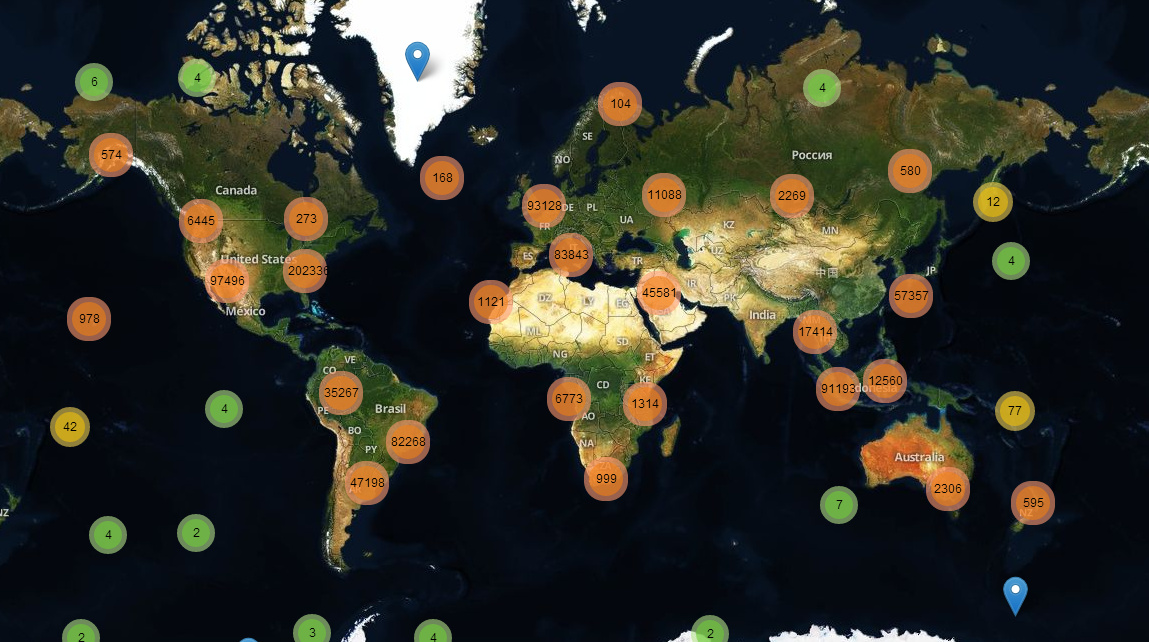 Example 2: Realtime clusters of tweets.
It’s working with Leaflet as an alternative to Leaflet.markercluster.
The library is designed for large datasets or live situations. The memory consumption is kept low and the library is fast on mobile devices, thanks to a new algorithm inspired by collision detection in physical engines.
Features
Realtime
The clusters can be updated in realtime. It’s perfect for live datasets or datasets you want to filter at runtime.
Fast
| Number of markers |
First step |
Update (low zoom level) |
Update (high zoom level) |
| 100 |
instant |
instant |
instant |
| 1 000 |
instant |
instant |
instant |
| 10 000 |
14ms |
3ms |
2ms |
| 60 000 |
70ms |
23ms |
9ms |
| 150 000 |
220ms |
60ms |
20ms |
| 1 000 000 |
1.9s |
400ms |
135ms |
These values are tested with random positions, on a recent laptop, using Chrome 38. One half of markers is moving randomly and the other half is static. It is also fast enough for mobile devices.
If you prefer real world data, the 50k Leaflet.markercluster example is computed in 60ms (original).
Weight
You can specify the weight of each marker.
For example, you may want to add more importance to a marker representing an incident, than a marker representing a tweet.
Categories
You can specify a category for the markers. Then a small object representing the number of markers for each category is attached to the clusters. This way, you can create cluster icons adapted to their content.


Dynamic cluster size
The size of a cluster can be adjusted on the fly (Example)
Filtering
The markers can be filtered easily with no performance cost.
Usage
Classic Way
<link rel="stylesheet" href="https://unpkg.com/[email protected]/dist/leaflet.css"
integrity="sha512-M2wvCLH6DSRazYeZRIm1JnYyh22purTM+FDB5CsyxtQJYeKq83arPe5wgbNmcFXGqiSH2XR8dT/fJISVA1r/zQ=="
crossorigin=""/>
<script src="https://unpkg.com/[email protected]/dist/leaflet.js"
integrity="sha512-lInM/apFSqyy1o6s89K4iQUKg6ppXEgsVxT35HbzUupEVRh2Eu9Wdl4tHj7dZO0s1uvplcYGmt3498TtHq+log=="
crossorigin=""></script>
<script src="PruneCluster/dist/PruneCluster.js"></script>
Webpack & NPM
npm install exports-loader prunecluster
import { PruneCluster, PruneClusterForLeaflet } from 'exports-loader?PruneCluster,PruneClusterForLeaflet!prunecluster/dist/PruneCluster.js'
Example
var pruneCluster = new PruneClusterForLeaflet();

...
var marker = new PruneCluster.Marker(59.8717, 11.1909);
pruneCluster.RegisterMarker(marker);
...

leafletMap.addLayer(pruneCluster);
PruneClusterForLeaflet constructor
PruneClusterForLeaflet([size](#set-the-clustering-size), margin);
You can specify the size and margin which affect when your clusters and markers will be merged.
size defaults to 120 and margin to 20.
Update a position
marker.Move(lat, lng);
Deletions
pruneCluster.RemoveMarkers();
pruneCluster.RemoveMarkers([markerA,markerB,...]);
Set the category
The category can be a number or a string, but in order to minimize the performance cost, it is recommended to use numbers between 0 and 7.
marker.category = 5;
Set the weight
marker.weight = 4;
Filtering
marker.filtered = true|false;
Set the clustering size
You can specify a number indicating the area of the cluster. Higher number means more markers “merged”. (Example)
pruneCluster.Cluster.Size = 87;
Apply the changes
Must be called when ANY changes are made.
pruneCluster.ProcessView();
Add custom data to marker object
Each marker has a data object where you can specify your data.
marker.data.name = 'Roger';
marker.data.ID = '76ez';
You can attach to the markers an icon object and a popup content
marker.data.icon = L.icon(...);
marker.data.popup = 'Popup content';
Faster leaflet icons
If you have a lot of markers, you can create the icons and popups on the fly in order to improve their performance.
function createIcon(data, category) {
    return L.icon(...);
}

...

marker.data.icon = createIcon;
You can also override the PreapareLeafletMarker method. You can apply listeners to the markers here.
pruneCluster.PrepareLeafletMarker = function(leafletMarker, data) {
leafletMarker.setIcon();
leafletMarker.on('click', function(){
});
if (leafletMarker.getPopup()) {
leafletMarker.setPopupContent(data.name);
} else {
leafletMarker.bindPopup(data.name);
}
};
Setting up a custom cluster icon
pruneCluster.BuildLeafletClusterIcon = function(cluster) {
var population = cluster.population,
stats = cluster.stats;
var markers = cluster.GetClusterMarkers()
...
return icon;
};
Listening to events on a cluster
To listen to events on the cluster, you will need to override the BuildLeafletCluster method. A click event is already specified on m, but you can add other events like mouseover, mouseout, etc. Any events that a Leaflet marker supports, the cluster also supports, since it is just a modified marker. A full list of events can be found here.
Below is an example of how to implement mouseover and mousedown for the cluster, but any events can be used in place of those.
pruneCluster.BuildLeafletCluster = function(cluster, position) {
var m = new L.Marker(position, {
icon: pruneCluster.BuildLeafletClusterIcon(cluster)
});
m.on('click', function() {
var markersArea = pruneCluster.Cluster.FindMarkersInArea(cluster.bounds);
var b = pruneCluster.Cluster.ComputeBounds(markersArea);
if (b) {
var bounds = new L.LatLngBounds(
new L.LatLng(b.minLat, b.maxLng),
new L.LatLng(b.maxLat, b.minLng));
var zoomLevelBefore = pruneCluster._map.getZoom();
var zoomLevelAfter = pruneCluster._map.getBoundsZoom(bounds, false, new L.Point(20, 20, null));
if (zoomLevelAfter === zoomLevelBefore) {
pruneCluster._map.fire('overlappingmarkers', {
cluster: pruneCluster,
markers: markersArea,
center: m.getLatLng(),
marker: m
});
pruneCluster._map.setView(position, zoomLevelAfter);
}
else {
pruneCluster._map.fitBounds(bounds);
}
}
});
m.on('mouseover', function() {
});
m.on('mouseout', function() {
});
return m;
};
};
Redraw the icons
Marker icon redrawing with a flag:
marker.data.forceIconRedraw = true;

...

pruneCluster.ProcessView();
Redraw all the icons:
pruneCluster.RedrawIcons();
Acknowledgements
This library was developed in context of the BRIDGE project. It is now supported by the community and we thank the contributors.
Licence
The source code of this library is licensed under the MIT License.


评论