Note✨: I have another amazing project on end-to-end-encrypted-chat-application using Next.js, Prisma, Postgresql, Express, Socket.io.
MERN Ecommerce is a full-stack application designed to transform your online shopping experience. Built with the MERN stack (MongoDB, Express.js, React, Node.js), it leverages Redux Toolkit for efficient state management and Material UI for a sleek, user-friendly interface. This project offers a robust platform for both users and admins, packed with essential features for a seamless experience.
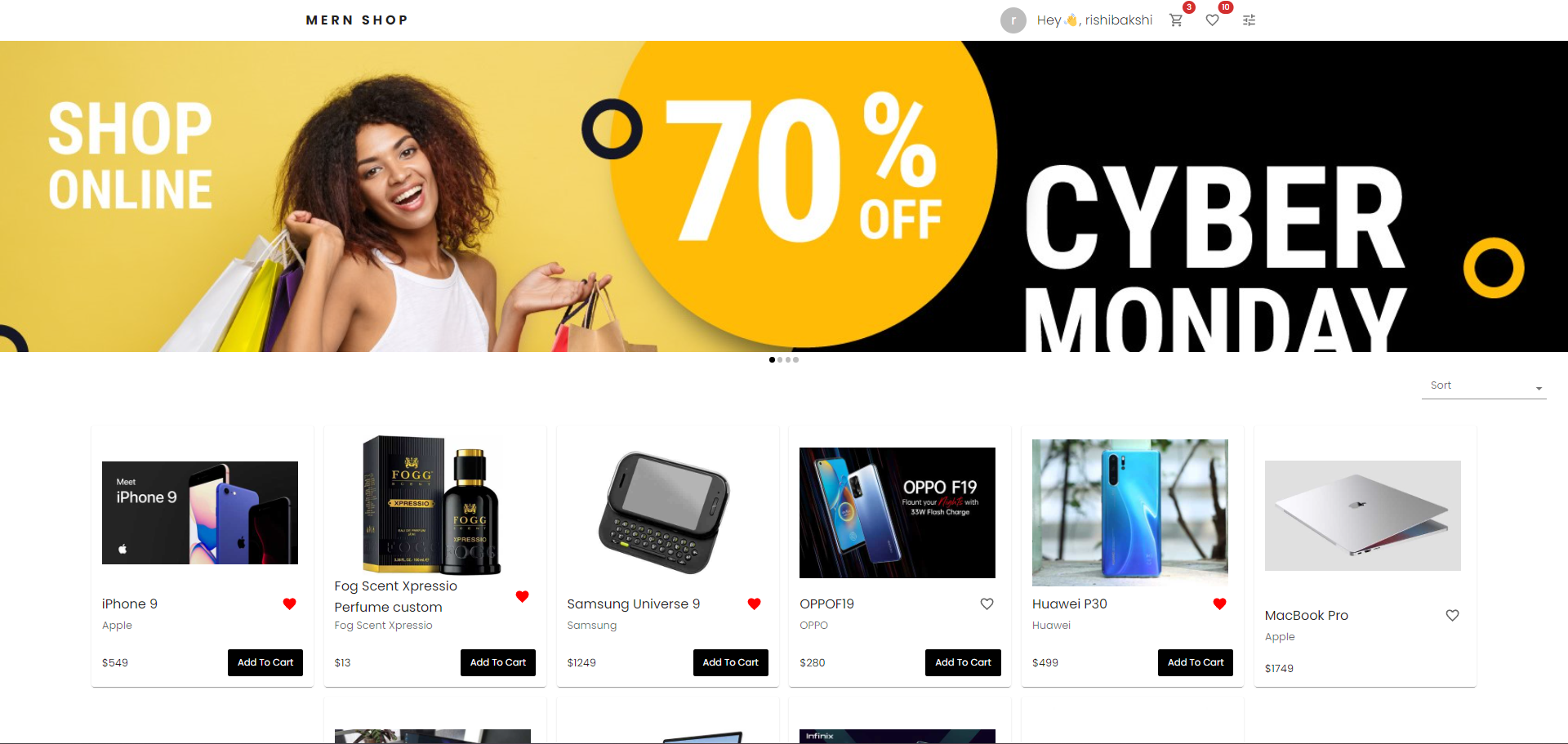

Features
User:
-
Product Reviews:
- Write, edit, and delete reviews.
- Instant updates on ratings and star percentages.
-
Wishlist:
- Add, remove, and annotate products with personalized notes.
-
Order Management:
- Create new orders and view order history.
-
Profile Management:
- Manage email, username, and multiple addresses.
-
Shopping Cart:
- Add products, adjust quantities, and view subtotals.
Admin:
-
Product Management:
- Add, edit, delete, and soft-delete products.
- Manage product attributes like name and stock.
-
Order Management:
- View and update order details and status.
Security & User Experience:
-
Secure Authentication:
- Login, signup, OTP verification, password reset, and logout.
-
Intuitive Interface:
- Powered by Material UI for a visually appealing and user-friendly experience.
Scalability:
- Built for Growth:
- Scalable architecture to handle increasing user demands.
Project Setup
Prerequisites
- Node.js ( version v21.1.0 or later )
- MongoDB installed and running locally
Clone the project
git clone https://github.com/RishiBakshii/mern-ecommerce.git
Navigate to the project directory
cd mern-ecommerce
Install dependencies for frontend and backend separately
Tip: To efficiently install dependencies for both frontend and backend simultaneously, use split terminals.
Install frontend dependencies
cd frontend
npm install
Install backend dependencies
cd backend
npm install
Environment Variables
Backend
- Create a
.env file in the backend directory.
- Add the following variables with appropriate values
# Database connection string
MONGO_URI="mongodb://localhost:27017/your-database-name"

# Frontend URL (adjust if needed)
ORIGIN="http://localhost:3000"

# Email credentials for sending password resets and OTPs
EMAIL="[email protected]"
PASSWORD="your-email-password"

# Token and cookie expiration settings
LOGIN_TOKEN_EXPIRATION="30d"  # Days
OTP_EXPIRATION_TIME="120000"  # Milliseconds
PASSWORD_RESET_TOKEN_EXPIRATION="2m"  # Minutes
COOKIE_EXPIRATION_DAYS="30"    # Days

# Secret key for jwt security
SECRET_KEY="your-secret-key"

# Environment (production/development)
PRODUCTION="false" # Initially set to false for development
Frontend
- Create a
.env file in the frontend directory
- Add the following variable:
# Backend URL (adjust if needed)
REACT_APP_BASE_URL="http://localhost:8000"
Important
- Replace all placeholders (e.g., your_database_name, your_email) with your actual values.
- Exclude the
.env file from version control to protect sensitive information.
Data seeding
- Get started quickly with pre-populated data: Populate your database with sample users, products, reviews, and carts, enabling you to test functionalities without manual data entry.
Steps:
- Open a new terminal window.
- Navigate to the
backend directory: cd backend
- Run the seeding script:
npm run seed ( This script executes the seed.js file within the seed subdirectory equivalent to running node seed/seed.js )
Running Development Servers
Important:
- Separate terminals: Run the commands in separate terminal windows or use
split terminal to avoid conflicts.
- Nodemon required: Ensure you have
nodemon installed globally to run the backend development servers using npm run dev. You can install it globally using npm install -g nodemon.
Start the backend server
- Navigate to the
backend directory: cd backend
- Start the server:
npm run dev (or npm start)
- You should see a message indicating the server is running, usually on port 8000.
Start the frontend server:
- Navigate to the
frontend directory: cd frontend
- Start the server:
npm start
- You should see a message indicating the server is running, usually on port 3000.
Login with demo account (Optional)
- After successfully seeding the database, you can now explore the application’s functionalities using pre-populated sample data.
- here are the
login credentials
  email: [email protected]
  pass: helloWorld@123
Accessing the Application
Once both servers are running, you can access them at the following URL’s:
Bonus
Don’t forget to star the repository and share your feedback!✨
Authors


评论