BSD 3-Clause "New" or "Revised" License

项目介绍

Qengineering/Jetson-Nano-image 是一个托管在 GitHub 上的开源项目,采用 BSD 3-Clause "New" or "Revised" License 许可证,目前获得 156 个 Star、24 次 Fork。

仓库全名
Qengineering/Jetson-Nano-image
开源许可证
BSD 3-Clause "New" or "Revised" License
Star 数
156
Fork 数
24
未关闭 Issue
21

README 摘要

Jetson Nano DNN image A Jetson Nano image with OpenCV, TensorFlow and Pytorch Installation. Get a 32 GB (minimal) SD-card which will hold the image. Download the JetsonNano.img.xz image (7.2 GByte!) from our server. Flash the image on the SD card with the Imager or balenaEtcher. According to issue #17, only flash the xz directly, not an unzipped img image. Insert the SD card in your Jetson Nano 4 GB RAM and enjoy…

完整内容见 GitHub 原始 README 或本页 。

常见问题

Jetson-Nano-image 可以免费商用吗?

仓库采用 BSD 3-Clause "New" or "Revised" License 许可证,可免费使用与修改,商业使用请遵守许可证条款(例如保留版权声明与许可声明)。

如何获取 Jetson-Nano-image 的源码?

可以直接克隆仓库:git clone https://github.com/Qengineering/Jetson-Nano-image.git,默认分支为 main;安装与运行步骤见仓库 README。

Jetson-Nano-image 最近还在维护吗?

仓库最近一次更新为 7月23日,当前有 21 个未关闭 Issue;Star 数为 156,可作为社区活跃度的参考。

关于

Jetson Nano image with deep learning frameworks

描述取自 GitHub 官方 API,中文内容由 GitRead 中文社区 编辑团队整理。

简要分析

热度分
215
价值分
100
活跃状态
活跃

README

Jetson Nano DNN image

output image

A Jetson Nano image with OpenCV, TensorFlow and Pytorch

License


Installation.

  • Get a 32 GB (minimal) SD-card which will hold the image.
  • Download the JetsonNano.img.xz image (7.2 GByte!) from our server.
  • Flash the image on the SD card with the Imager or balenaEtcher.
  • According to issue #17, only flash the xz directly, not an unzipped img image.
  • Insert the SD card in your Jetson Nano 4 GB RAM and enjoy.
  • Username: jetson
  • Password: jetson
  • JetsonNano.img.xz md5sum: 621F2E4E0B7775E5293E2186C96E91AA

GDrive.

In some parts of the world, getting a good, solid connection to Sync is difficult. That is why we’ve also provided a copy on Google Drive. However, Google Drive limits the number of daily downloads. Please be considerate and use Google Drive only if necessary.


Tips.

  • If you are in need of extra space, you can delete the opencv and the opencv_contrib folder from the SD card. They are no longer needed since all libraries are placed in the /usr/ directory.
  • Use a tool like GParted sudo apt-get install gparted to expand the image to larger SD cards. We recommend a minimum of 64 GB. Deep learning simply requires a lot of space.


Pre-installed frameworks.

TensorFlow 2.5 and above require CUDA 11. CUDA version 11 cannot be installed on a Jetson Nano due to incompatibility between the GPU and low-level software at this time; hence, TensorFlow 2.4.1. Only when NVIDIA releases a JetPack with CUDA 11 will we be able to upgrade TensorFlow.

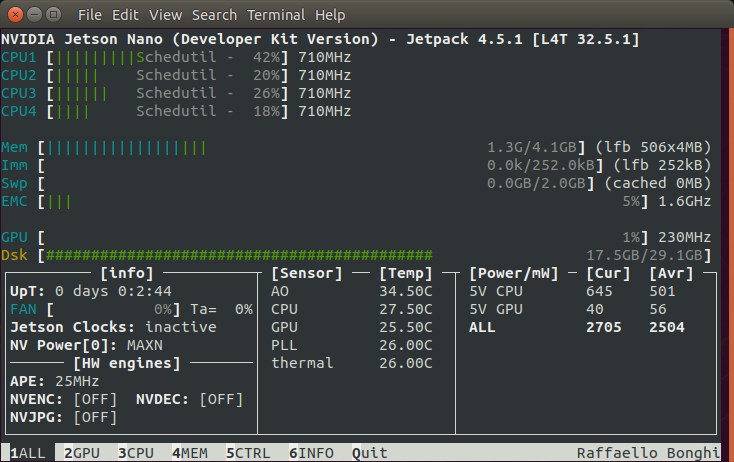
output image

output image


OpenCV + TensorFlow.

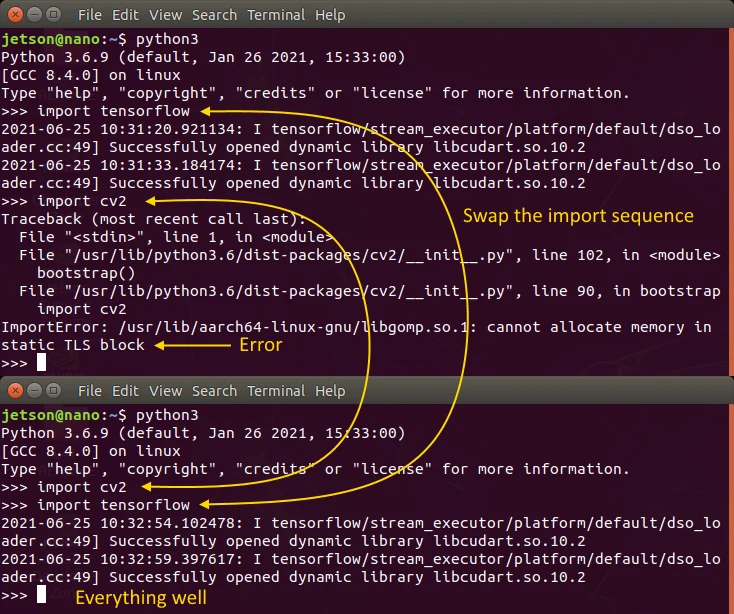
Importing both TensorFlow and OpenCV in Python can throw the error: cannot allocate memory in static TLS block.
This behaviour only occurs on an aarch64 system and is caused by the OpenMP memory requirements not being met.
For more information, see GitHub ticket #14884.

output image

There are a few solutions. The easiest is to import OpenCV at the beginning, as shown above.
The other is disabling OpenMP by setting the -DBUILD_OPENMP and -DWITH_OPENMP flags OFF.
Where possible, OpenCV will now use the default pthread or the TBB engine for parallelisation.
We don’t recommend it. Not all OpenCV algorithms automatically switch to pthread.
Our advice is to import OpenCV into Python first before anything else.


paypal

评论

暂无评论