wl-gammarelay-rs
Like wl-gammarelay, but written in rust, runs on a single thread and has zero runtime dependencies.
Dbus interface
$ busctl --user introspect rs.wl-gammarelay / rs.wl.gammarelay
NAME               TYPE      SIGNATURE RESULT/VALUE FLAGS
.ToggleInverted    method    -         -            -
.UpdateBrightness  method    d         -            -
.UpdateGamma       method    d         -            -
.UpdateTemperature method    n         -            -
.Brightness        property  d         1            emits-change writable
.Gamma             property  d         1            emits-change writable
.Inverted          property  b         false        emits-change writable
.Temperature       property  q         6500         emits-change writable
Installation
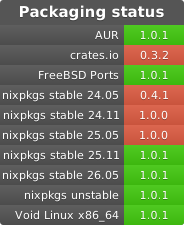
From Source
cargo install wl-gammarelay-rs --locked
Status bar integration
i3status-rust
i3status-rust hueshift block has the builtin support for this backend since 0.21.6.
Waybar
"custom/wl-gammarelay-temperature": {
"format": "{} ",
"exec": "wl-gammarelay-rs watch {t}",
"on-scroll-up": "busctl --user -- call rs.wl-gammarelay / rs.wl.gammarelay UpdateTemperature n +100",
"on-scroll-down": "busctl --user -- call rs.wl-gammarelay / rs.wl.gammarelay UpdateTemperature n -100"
},
"custom/wl-gammarelay-brightness": {
"format": "{}% ",
"exec": "wl-gammarelay-rs watch {bp}",
"on-scroll-up": "busctl --user -- call rs.wl-gammarelay / rs.wl.gammarelay UpdateBrightness d +0.02",
"on-scroll-down": "busctl --user -- call rs.wl-gammarelay / rs.wl.gammarelay UpdateBrightness d -0.02"
},
"custom/wl-gammarelay-gamma": {
"format": "{}% γ",
"exec": "wl-gammarelay-rs watch {g}",
"on-scroll-up": "busctl --user -- call rs.wl-gammarelay / rs.wl.gammarelay UpdateGamma d +0.02",
"on-scroll-down": "busctl --user -- call rs.wl-gammarelay / rs.wl.gammarelay UpdateGamma d -0.02"
},
Note: make sure wl-gammarelay-rs is in your PATH at the time waybar is launched, or use the full path to the binary.
wl-gammarelay-applet
wl-gammarelay-applet is a small desktop applet for controlling wl-gammarelay-rs.
Watch for changes
You can run wl-gammarelay-rs watch <format> to watch for changes. Each time some property changes, a new line will be printed based on string. {t} expands into temperature, {b} into brightness (0 to 1) and {bp} expands into brightness in percents (0 to 100).
For example, if you want to monitor both temperature and brightness (in percents), you can run
$ wl-gammarelay-rs watch "{t}K {bp}%"
4000K 90%
4500K 90%
5000K 90%
5000K 100%
5000K 80%
5000K 100%
...
Example usage in scripts
# Set the temperature to `5000`
busctl --user set-property rs.wl-gammarelay / rs.wl.gammarelay Temperature q 5000

# Increase the temperature by `100`:
busctl --user -- call rs.wl-gammarelay / rs.wl.gammarelay UpdateTemperature n 100

# Decrease the temperature by `100`:
busctl --user -- call rs.wl-gammarelay / rs.wl.gammarelay UpdateTemperature n -100

# Invert colors
busctl --user set-property rs.wl-gammarelay / rs.wl.gammarelay Inverted b true

# Toggle inverted colors
busctl --user -- call rs.wl-gammarelay / rs.wl.gammarelay ToggleInverted

# Set the brightness to `100%`:
busctl --user set-property rs.wl-gammarelay / rs.wl.gammarelay Brightness d 1

# Increase the brightness by `10%`:
busctl --user -- call rs.wl-gammarelay / rs.wl.gammarelay UpdateBrightness d 0.1

# Decrease the brightness by `10%`:
busctl --user -- call rs.wl-gammarelay / rs.wl.gammarelay UpdateBrightness d -0.1

# Set display gamma to `1.0`:
busctl --user set-property rs.wl-gammarelay / rs.wl.gammarelay Gamma d 1

# Increase gamma by `0.1`:
busctl --user -- call rs.wl-gammarelay / rs.wl.gammarelay UpdateGamma d 0.1

# Decrease gamma by `0.1`:
busctl --user -- call rs.wl-gammarelay / rs.wl.gammarelay UpdateGamma d -0.1
With multiple outputs
Each connected output is listed under /outputs and its properties can be seen and edited separately. For example, a laptop with an internal “eDP-1” monitor and a “HDMI-A-1” output has the following DBus objects:
$ busctl --user tree rs.wl-gammarelay
└─ /outputs
  ├─ /outputs/HDMI_A_1
  └─ /outputs/eDP_1
You can operate on a specific output using its object path:
# Set the temperature to `5000` for the HDMI output
busctl --user set-property rs.wl-gammarelay /outputs/HDMI_A_1 rs.wl.gammarelay Temperature q 5000

# Set the temperature to `9000` for the internal monitor
busctl --user set-property rs.wl-gammarelay /outputs/eDP_1 rs.wl.gammarelay Temperature q 9000
When there are several outputs, the values shown are:
- for the brightness, temperature and gamma, the average of all outputs’ values
- for the inverted boolean, true if all outputs are inverted and false otherwise
When updating the brightness, temperature or gamma value, the modification is applied to each output:
# Get the values
$ busctl --user -- get-property rs.wl-gammarelay /outputs/eDP_1 rs.wl.gammarelay Brightness
d 0.7
$ busctl --user -- get-property rs.wl-gammarelay /outputs/HDMI_A_1 rs.wl.gammarelay Brightness
d 0.5

# Update all outputs
$ busctl --user -- call rs.wl-gammarelay / rs.wl.gammarelay UpdateBrightness d 0.05

# Get the values again
$ busctl --user -- get-property rs.wl-gammarelay /outputs/eDP_1 rs.wl.gammarelay Brightness
d 0.75
$ busctl --user -- get-property rs.wl-gammarelay /outputs/HDMI_A_1 rs.wl.gammarelay Brightness
d 0.55
When toggling the inverted status:
- if all the monitors are inverted, then all of them are reverted to normal
- otherwise, all monitors are made inverted, even if they already were inverted


评论