⚠️ [DEPRECATED]
This library is no longer maintained.
It relies on RenderScript, which has been deprecated and removed from modern Android build tools. Using this library in new projects will cause build failures.
Modern Alternatives (Jetpack Compose)
1. For “Glassmorphism” / Frosted Glass (The Etsy Effect):
Use the Haze library by Chris Banes. It is the community standard for high-performance blurring and glass effects in Compose.
2. For Simple Blurs (Android 12+):
If you only need to blur an image or a composable on newer devices, the native modifier could be your option:
Image(
    painter = painterResource(id = R.drawable.my_image),
    contentDescription = null,
    modifier = Modifier.blur(10.dp) // Requires API 31+ (Android 12)
)
EtsyBlur


EtsyBlur is an Android library that allows developers to easily add a glass-like blur effect
implemented in the past Etsy app.
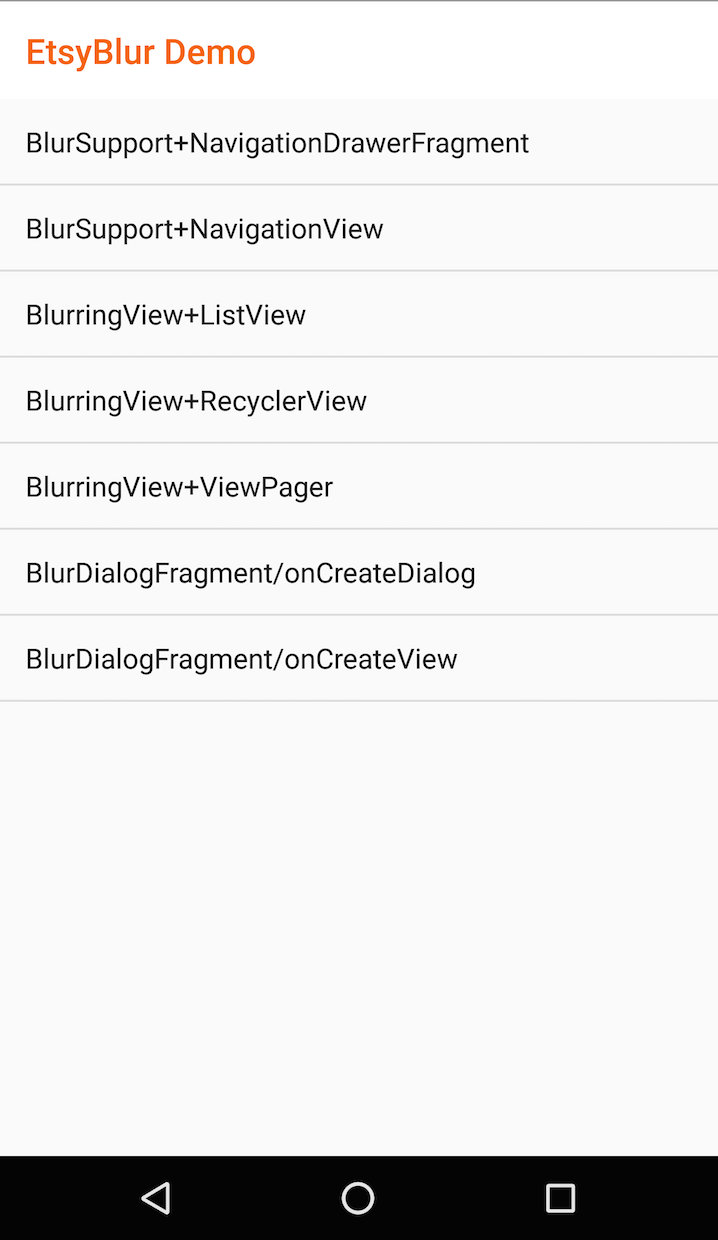
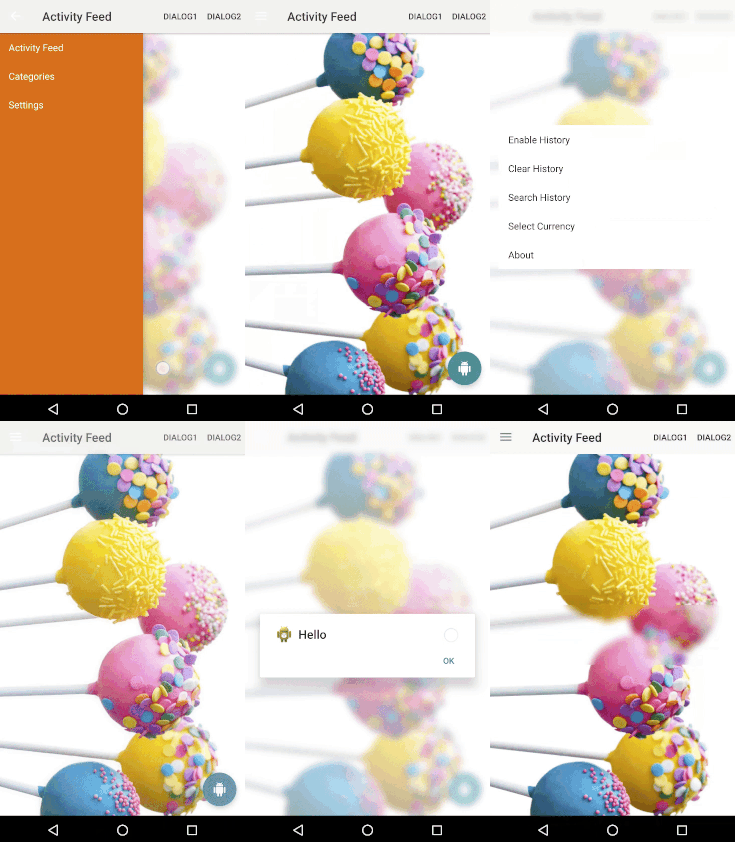
Try out the sample application:

Requirements
API Level 11 (Honeycomb) and above.
Setup
The library is pushed to Maven Central as an AAR,
so you just need to add the followings to your build.gradle file:
dependencies {
    compile 'com.ms-square:etsyblur:0.2.1'
}

android {
    defaultConfig {
        renderscriptTargetApi 25
        renderscriptSupportModeEnabled true
    }
}
Usage
Using the library is really simple, read the following instructions or your can also look at the source code of the provided sample.
For NavigationView
// ex...Inside Activity's onCreate()
drawerLayout = (DrawerLayout) findViewById(R.id.drawer_layout);
BlurSupport.addTo(drawerLayout);
The above code just works if you have the com.ms_square.etsyblur.BlurringView with id set to @id/blurring_view within your layout xml file.
Please place it between the first child view of your DrawerLayout and NavigationView; otherwise, it will not work as expected.
<?xml version="1.0" encoding="utf-8"?>
<android.support.v4.widget.DrawerLayout
xmlns:android="http://schemas.android.com/apk/res/android"
xmlns:app="http://schemas.android.com/apk/res-auto"
xmlns:tools="http://schemas.android.com/tools"
android:id="@+id/drawer_layout"
android:layout_width="match_parent"
android:layout_height="match_parent"
android:fitsSystemWindows="true"
tools:openDrawer="start">
<LinearLayout
android:layout_width="match_parent"
android:layout_height="match_parent"
android:orientation="vertical">
<android.support.v7.widget.Toolbar
android:id="@+id/toolbar"
android:layout_width="match_parent"
android:layout_height="wrap_content"
android:minHeight="?attr/actionBarSize"
android:background="?attr/colorPrimary"/>
<FrameLayout
android:id="@+id/content_view"
android:layout_width="match_parent"
android:layout_height="match_parent" />
</LinearLayout>
<com.ms_square.etsyblur.BlurringView
android:id="@id/blurring_view"
android:layout_width="match_parent"
android:layout_height="match_parent">
</com.ms_square.etsyblur.BlurringView>
<android.support.design.widget.NavigationView
android:id="@+id/nav_view"
android:layout_width="wrap_content"
android:layout_height="match_parent"
android:layout_gravity="start"
android:fitsSystemWindows="true"
android:background="@color/bg_drawer"
app:itemTextColor="@android:color/white"
app:menu="@menu/navigation_view_drawer" />
</android.support.v4.widget.DrawerLayout>
For NavigationDrawer
// ex...Inside Activity's onCreate()
drawerLayout = (DrawerLayout) findViewById(R.id.drawer_layout);
navigationDrawerFragment.setUp(R.id.navigation_drawer, drawerLayout);
BlurSupport.addTo(drawerLayout);
The above code just works if you have the com.ms_square.etsyblur.BlurringView with id set to @id/blurring_view within your layout xml file.
Please place it between the first child view of your DrawerLayout and NavigationDrawerFragment; otherwise, it will not work as expected.
<android.support.v4.widget.DrawerLayout
xmlns:android="http://schemas.android.com/apk/res/android"
xmlns:tools="http://schemas.android.com/tools"
android:id="@+id/drawer_layout"
android:layout_width="match_parent"
android:layout_height="match_parent"
tools:context=".NavigationDrawerActivity">
<FrameLayout
android:id="@+id/content_view"
android:layout_width="match_parent"
android:layout_height="match_parent" />
<com.ms_square.etsyblur.BlurringView
android:id="@id/blurring_view"
android:layout_width="match_parent"
android:layout_height="match_parent">
</com.ms_square.etsyblur.BlurringView>
<fragment android:id="@+id/navigation_drawer"
android:layout_width="@dimen/navigation_drawer_width"
android:layout_height="match_parent"
android:layout_gravity="start"
android:name="com.ms.square.android.etsyblurdemo.NavigationDrawerFragment"
tools:layout="@layout/fragment_navigation_drawer" />
</android.support.v4.widget.DrawerLayout>
For DialogFragment
This is an abstract class to make the dialog background into the blurred image of its holding activity’s content. BlurDialogFragment supports asynchronous blur operation provided via Blur - for Simple Blur Effect on bitmaps. Its asynchronous execution policy is determined by the given AsyncPolicy.
Simple usage using inheritance
If you are using android.support.v4.app.DialogFragment, just extend BlurDialogFragment.
Using BlurConfig, experiment with the blur radius, the down scale factor, and the overlay coloring to obtain the blur effect you want for your app.
/**
 * Simple dialog fragment with background blurring effect.
 */
public class CreateDialogDialogFragment extends BlurDialogFragment {
@Override
    public Dialog onCreateDialog(Bundle savedInstanceState) {
        AlertDialog dialog = new AlertDialog.Builder(getActivity(), R.style.EtsyBlurAlertDialogTheme)
                .setIcon(R.drawable.ic_launcher)
                .setTitle("Hello")
                .setPositiveButton("OK", null)
                .create();
        return dialog;
    }

    @NonNull
    protected BlurConfig blurConfig() {
        return new BlurConfig.Builder()
                .asyncPolicy(SmartAsyncPolicyHolder.INSTANCE.smartAsyncPolicy())
                .debug(true)
                .build();
    }
}
Note:
In your DialogFragment, override either onCreateDialog() or onCreateView(), not both.
For a onCreateView() example, please look at the CreateViewDialogFragment in provided sample.
I quickly wrote this minimum BlurDialogFragment just to mimic old-Etsy app’s blurring dialog implementation.
So, there are missing options/features I should probably add in the future such as a toolbar/actionbar exclusion option, non-support library’s DialogFragment support…etc.
BlurringView
BlurringView can blur the target view’s content automatically.
In this library, it’s being used to automatically blur the content within DrawerLayout.
Available custom attributes in layout xml
Radius used to blur the target view.
- downScaleFactor - [integer]
Factor used to down scale the target view before blurring.
Making this value higher results in faster blurring time and less memory allocation, but degreades final rendering quality.
Color used to overrlay the blurred image
- allowFallback - [boolean]
If true, it fall backs to Java’s fastblur implementation when rederscript is not available. If false, performs no blurring in such case.
When set to true, it will output logcat debug messages of blur operations such as blur method used, if executing in background, and time each blur operation took.
You can also set the configuration dynamically by calling void blurConfig(BlurConfig config) method of BlurringView at runtime. Please not that it must be called before BlurringView’s onAttachedToWindow() gets called. When called, it will overwrite the configuration pased through custom attributes in your layout xml file.
All the custom attribute options plus the following parameter is currently available.
Policy used to determine whether to execute blurring operation in background thread or not.
NOTE:
BlurringView is based on the implementation of 500px Android Blurring View.
Compared with its original implementation, there are several changes such as the followings.
- If renderscript is not available, it can optionally fallback to the Java’s fastblur implementation.
- No need to call invalidate manually on the target blurredView.
- The number of bitmaps used is reduced to 1.
- Does not crash if the target blurredView is set to the BlurringView’s parent.
- Support for the layout preview UI via the isInEditMode() method
- Support to work with ViewPager
BlurringView currently does not support asynchronous execution of a blur operation. For now, just adjust downSampleFactor and blurRadius to get fast enough performance to just run it on the UI thread. I will ponder if the need for asynchronous suppport justifies added code complexity mainly due to threading.
Blur - for Simple Blur Effect on bitmaps
Blur class is being used internally for both BlurringView and BlurDialogFragment to provide the blur operation as well.
Simple Usage
Blur blur = new Blur(context, blurConfig)

// Run synchronously
// true if inBitmap is reusable as the output
Bitmap blurredBitmap = blur.execute(inBitmap, true);

// Run synchronously or asynchronously depending on the given AsyncPolicy
// via blurConfig.
blur.execute(inBitmap, true, new BlurEngine.Callback() {
    @Override
    public void onFinished(@Nullable Bitmap blurredBitmap) {
    	blurImgView.setImageBitmap(blurredBitmap);
    }
});

// when done, make sure to call destroy() which will clean up used resources and
// cancel any remaining backgroud work
blur.destroy();
This IF defines policy used to determine whether to execute blurring operation in background thread or not.
Currently, the follwing policies are provided.
- SimpleAsyncPolicy (Default)
If renderscript is available to use, always execute blur operation synchronously; otherwis execute asynchronously.
Always execute blur operation asynchronously.
Dynamically guess computation time required and determins to execute blur operation asynchronously or not.
If the estimated computation time exceeds 16ms, it will run asynchronously.
Change logs
- 0.2.1 : Fixed BlurringView to work with ViewPager (3/2017)
- 0.2.0 : Mostly re-wrote old outdated code and updated IFs. Noticed Etsy app no longer uses blur… Might re-consider current library structures (3/2017)
- 0.1.4 : Fix to fall back to Java’s fast blur when renderscript is unavailable. (3/2017)
- 0.1.3 : Fix issues when window has a navigation bar in BlurDialogFragmentHelper. (11/2015)
- 0.1.2 : Fix zero width/height exception in BlurDialogFragmentHelper. (8/2015)
- 0.1.1 : Fix NullPointerExcepiton if DialogFragment implements onCreateDialog. (5/2015)
- 0.1.0 : Initial Release. (12/2014)
License
Copyright 2014 Manabu Shimobe

Licensed under the Apache License, Version 2.0 (the "License");
you may not use this file except in compliance with the License.
You may obtain a copy of the License at

http://www.apache.org/licenses/LICENSE-2.0

Unless required by applicable law or agreed to in writing, software
distributed under the License is distributed on an "AS IS" BASIS,
WITHOUT WARRANTIES OR CONDITIONS OF ANY KIND, either express or implied.
See the License for the specific language governing permissions and
limitations under the License.


评论