
English |
简体中文
A large language model(LLM) plugin that allows you to interact with LLM in Neovim.
- Supports any LLM, such as GPT, GLM, Kimi, DeepSeek, Gemini, Qwen or local LLMs (such as ollama).
- Allows you to define your own AI tools, with different tools able to use different models.
- Most importantly, you can use free models provided by any platform (such as
Copilot, GitHub models, SiliconFlow, openrouter, Cloudflare or other platforms).
The configurations of different LLMs (such as ollama, deepseek), UI configurations, and AI tools (including code completion) should be checked in the examples first. Here you will find most of the information you want to know. Additionally, before using the plugin, you should ensure that your LLM_KEY is valid and that the environment variable is in effect.
Additionally, you should also take a look at wiki and docs.
Contents
Screenshots
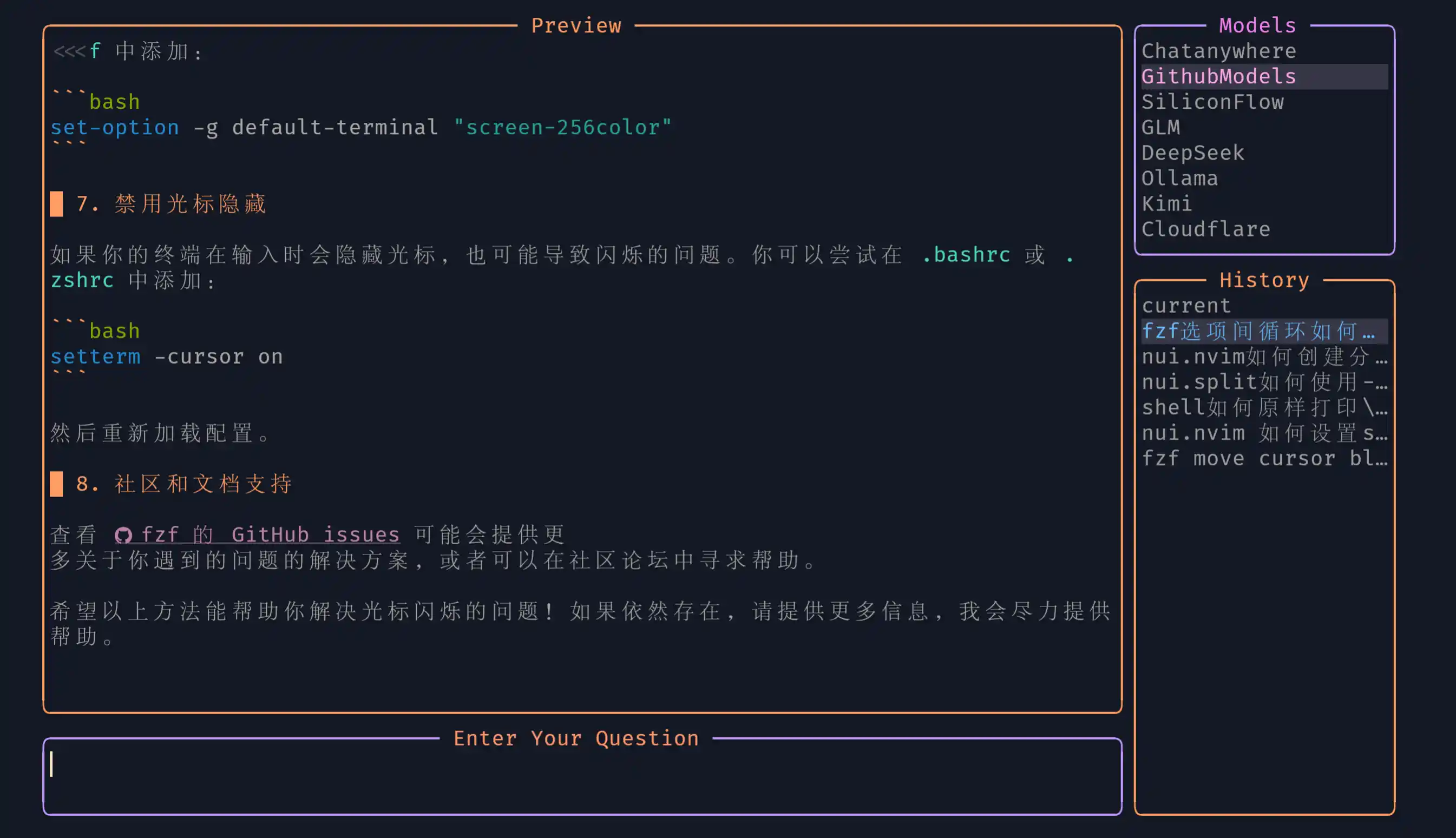
Chat
models | UI
Press ? can display the shortcut key help window

enable_cword_context = true: Translate the text under the cursor in normal mode.

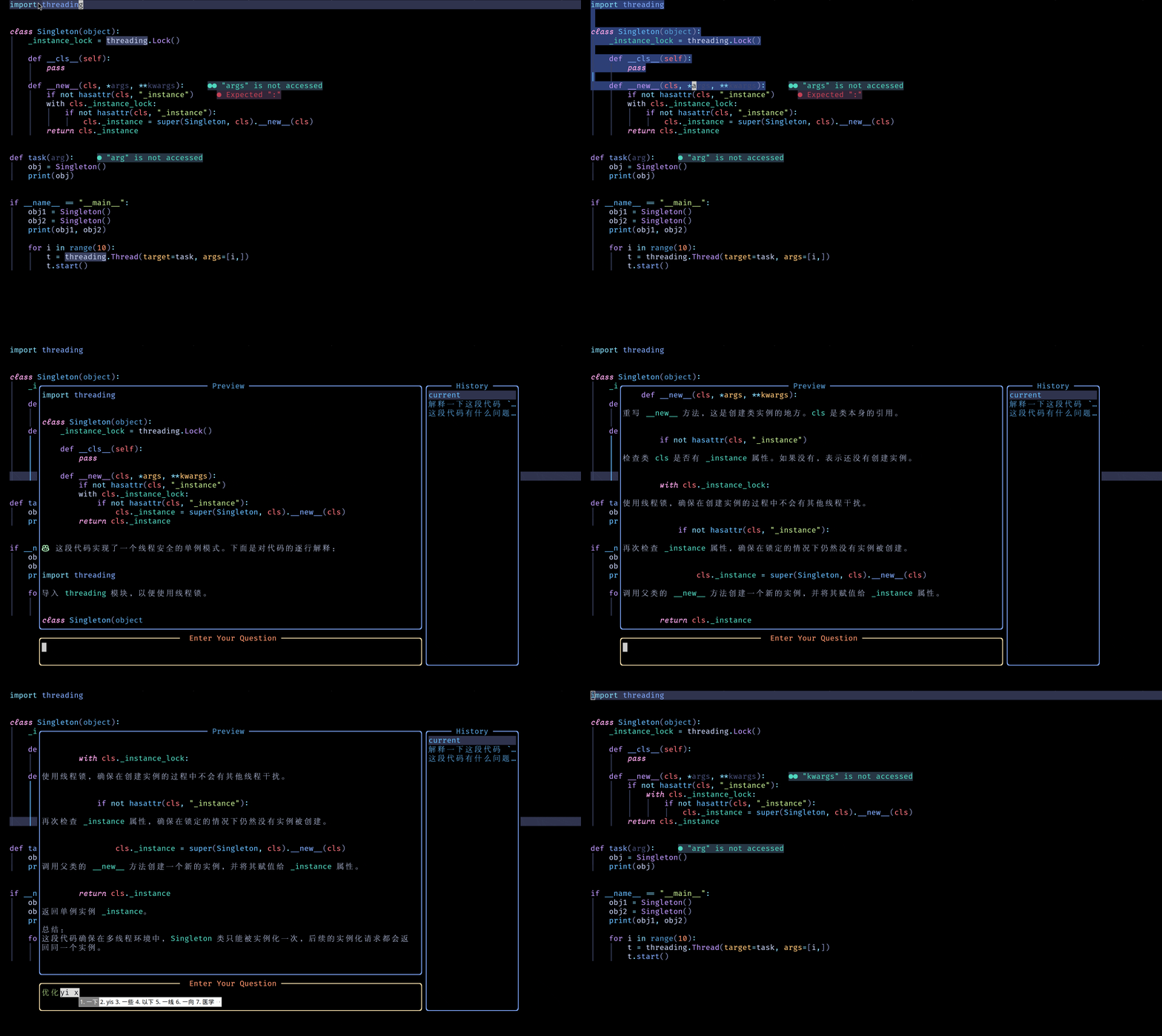
Explain Code
Streaming output | Non-streaming output

One-time, no history retained.
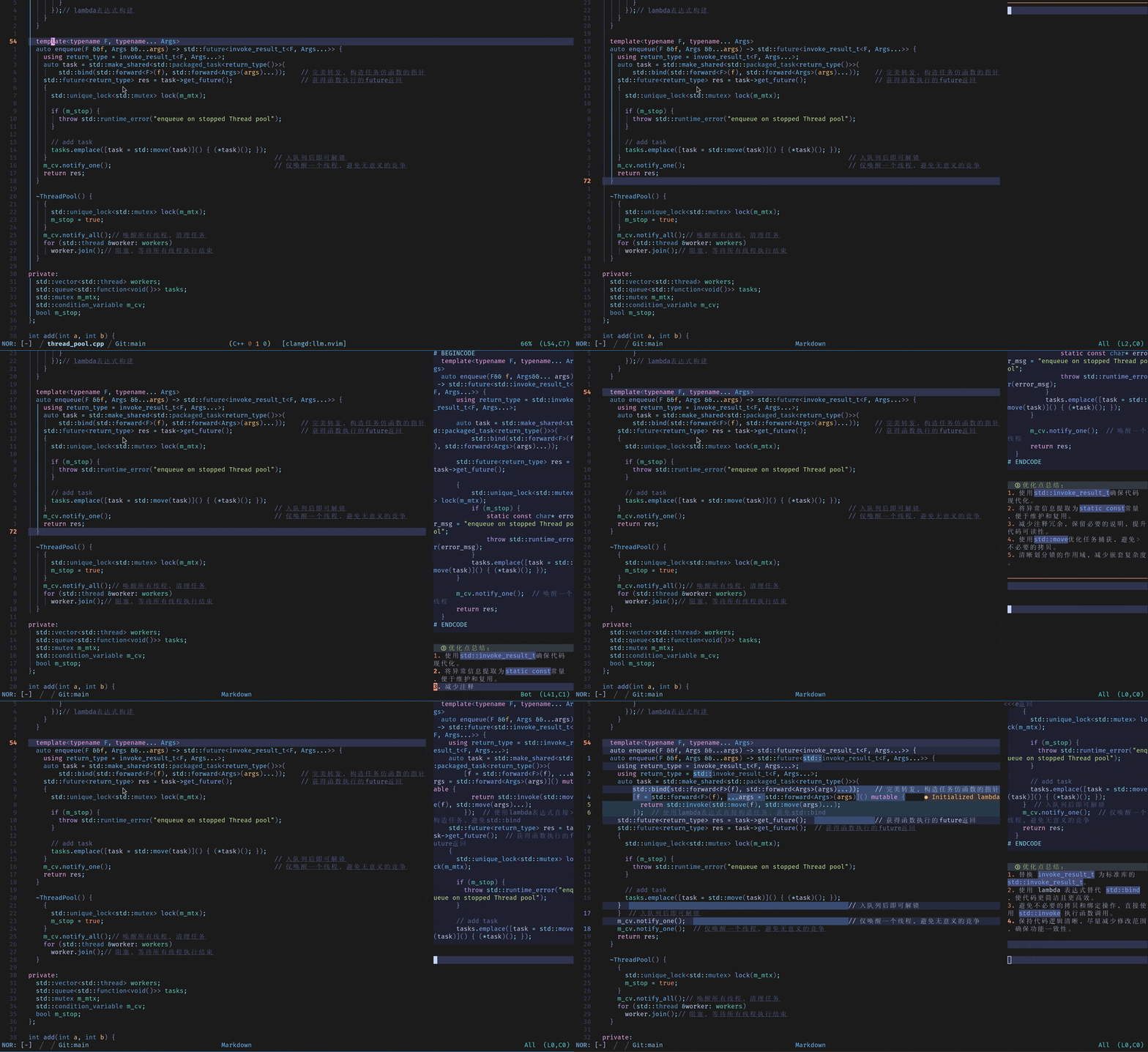
You can configure inline_assistant to decide whether to display diffs (default: show by pressing ‘d’).

You can configure inline_assistant to decide whether to display diffs (default: show by pressing ‘d’).
Optimize Code



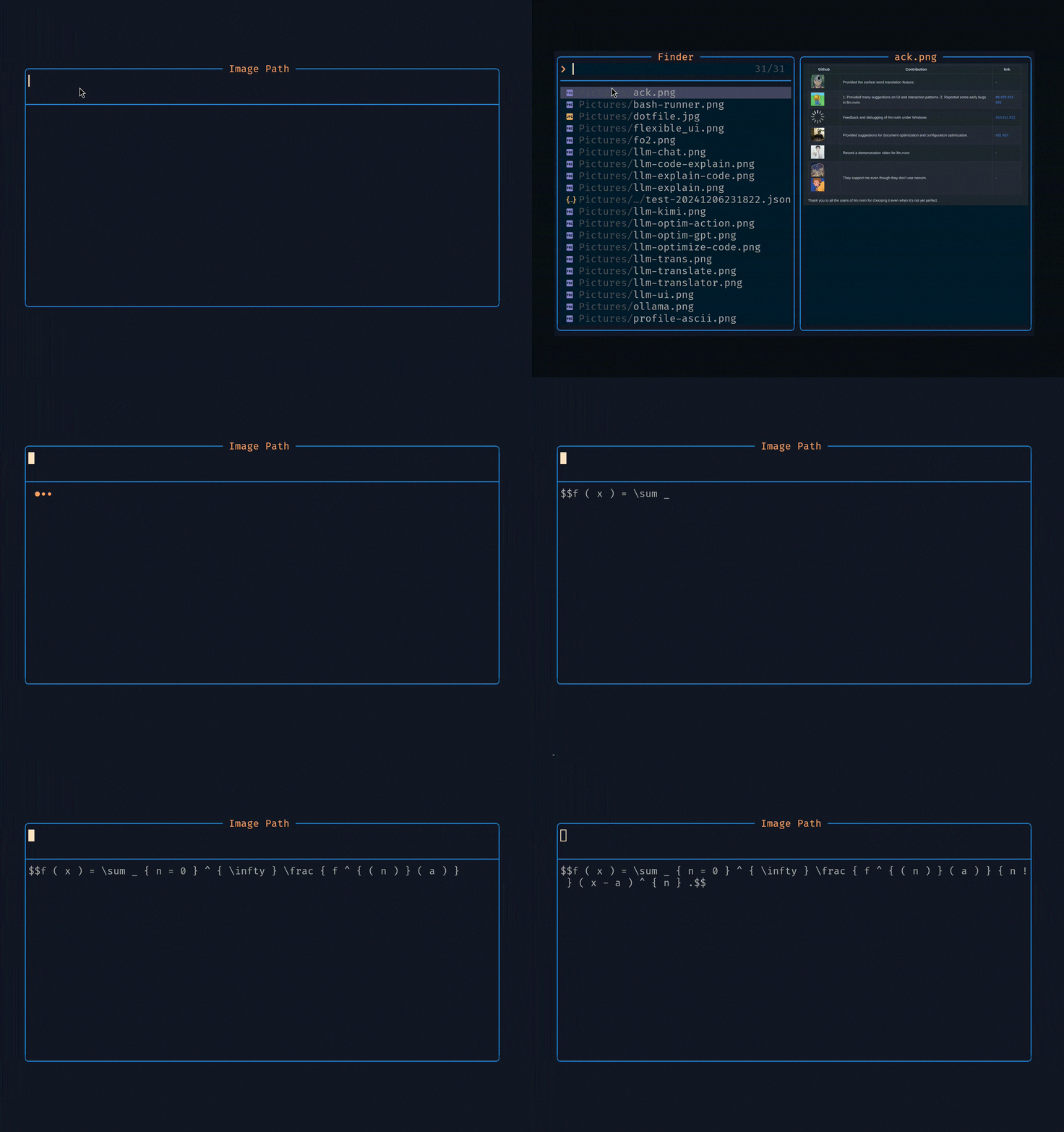
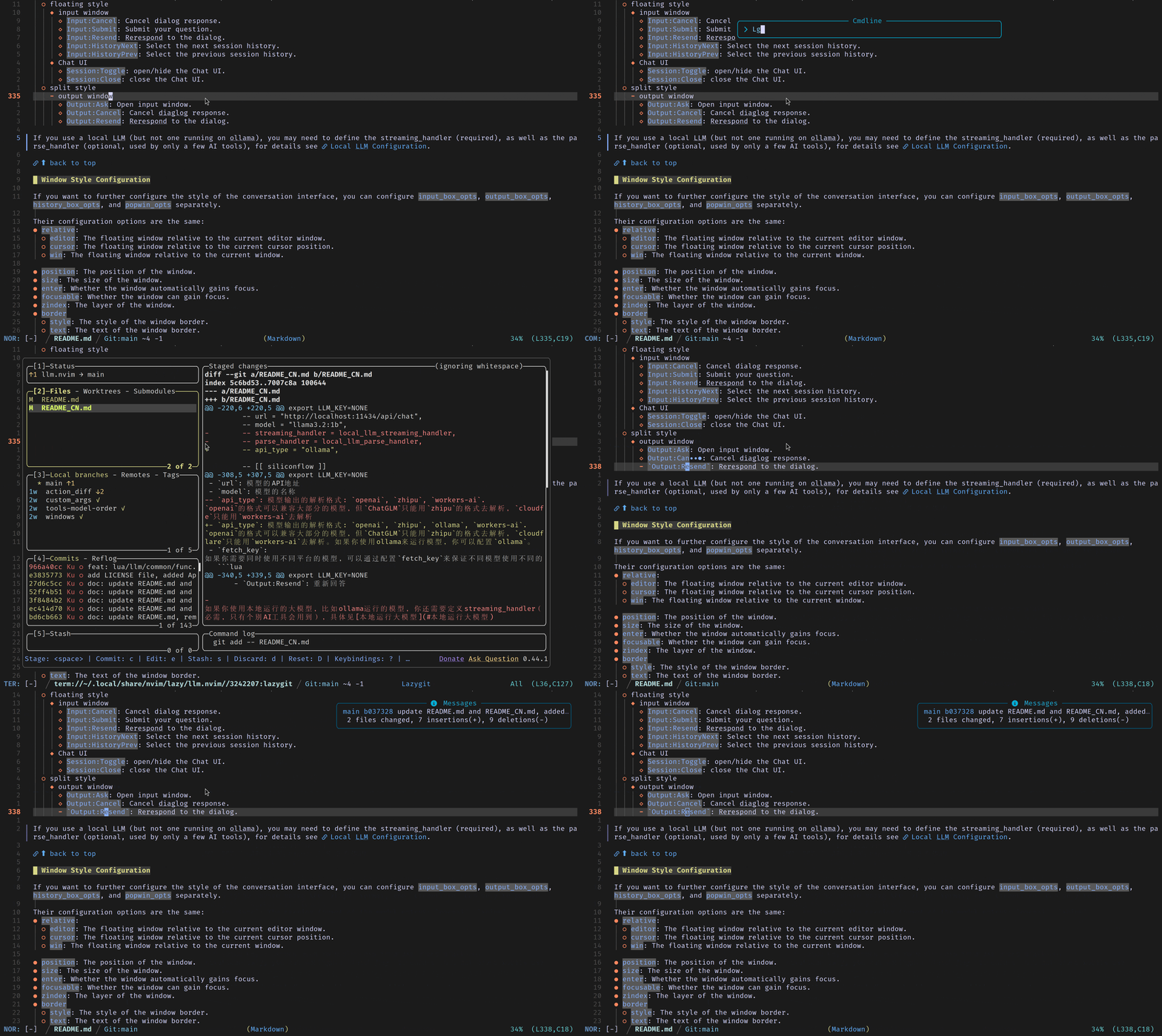
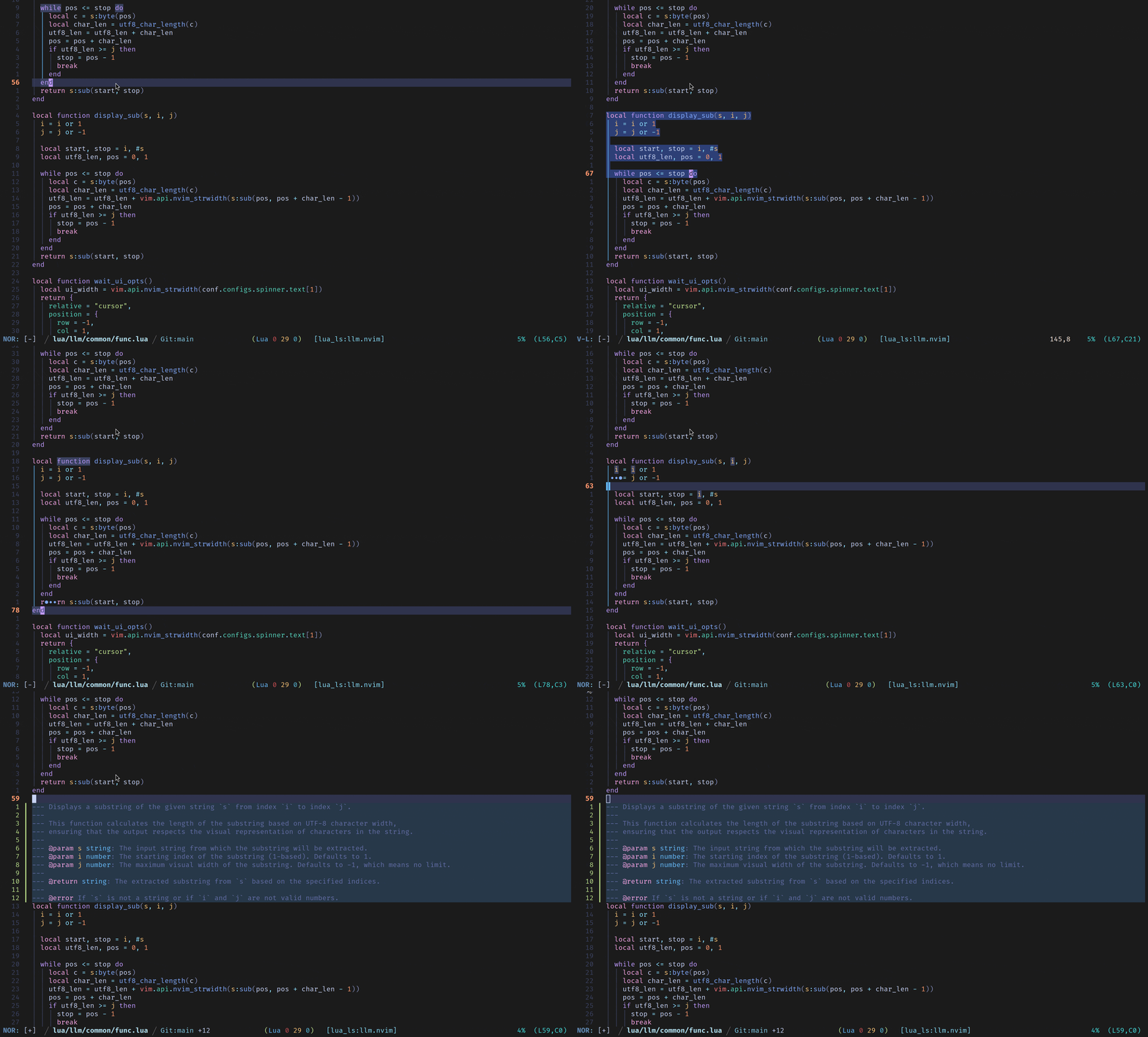
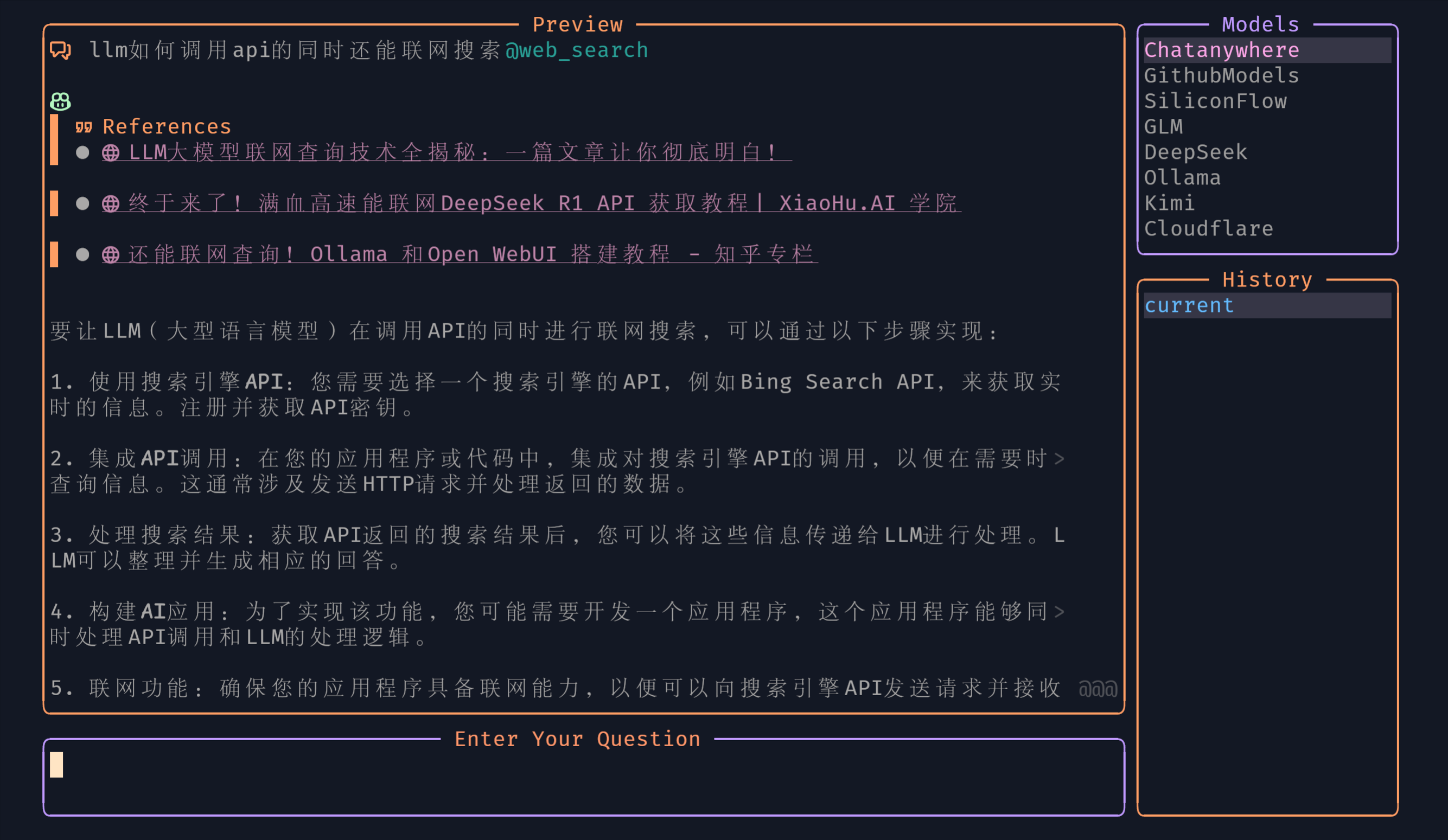
/buffer | /file | @web_search
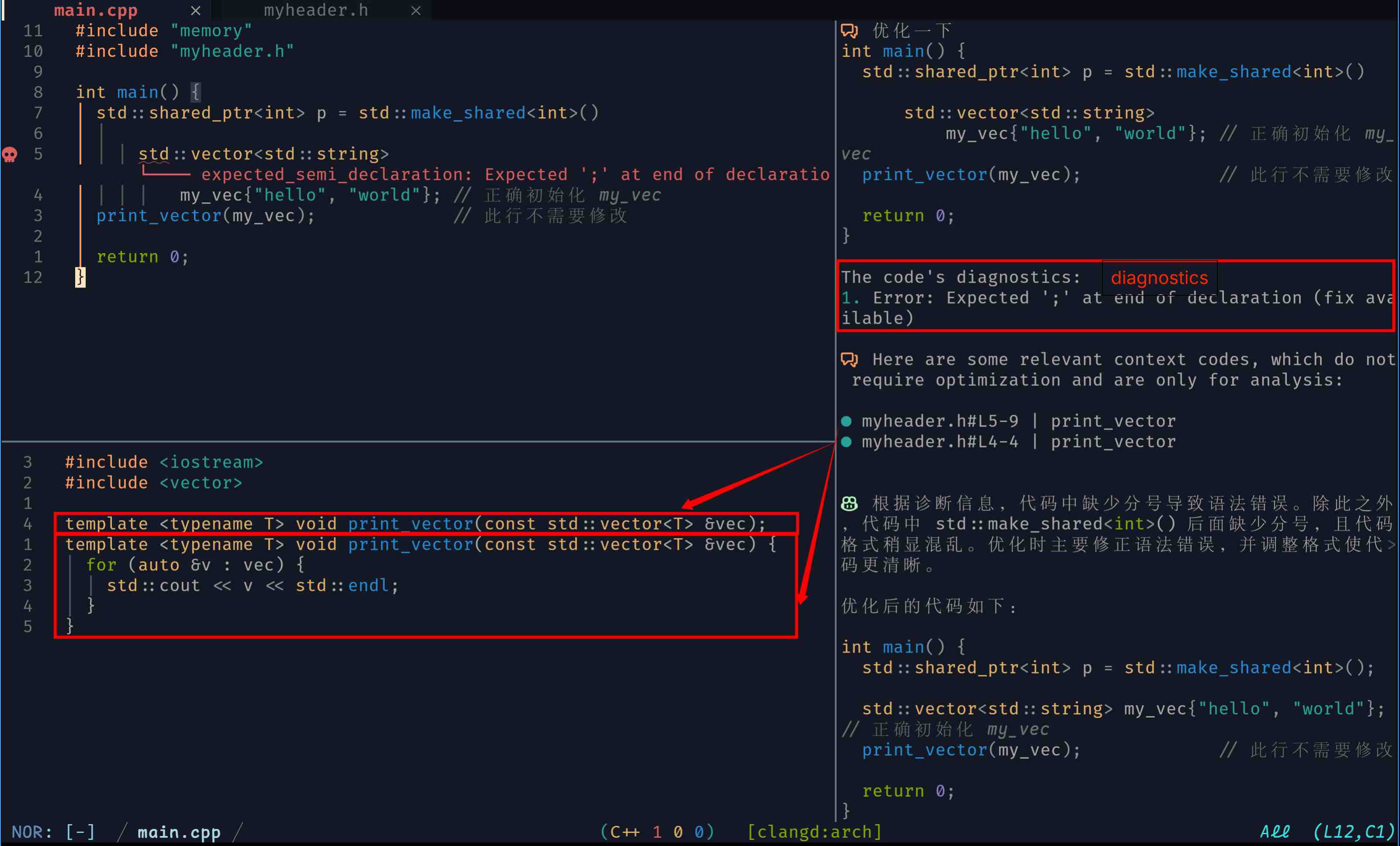
Diagnostic
Both disposable_ask_handler, attach_to_chat_handler, side_by_side_handler and action_handler can enable diagnostic features:
diagnostic = { min = vim.diagnostic.severity.HINT },
-- or
-- diagnostic = { vim.diagnostic.severity.WARN, vim.diagnostic.severity.ERROR },
-- see `:h diagnostic-severity`

Lsp
New features, still in continuous iteration.
Both disposable_ask_handler, attach_to_chat_handler, and action_handler can enable lsp features:
lsp = {
  cpp = { methods = { "definition", "declaration" } },
  python = { methods = { "definition" } },
  lua = { methods = { "definition", "declaration" } },

  root_dir = { {'pyproject.toml', 'setup.py' }, ".git" },
},
⬆ back to top
Installation
Dependencies
curlfzf >= 0.37.0: Optional. Split style preview of session history and image recognition tool image selection depends on fzf(The author’s development environment is 0.39.0)render-markdown.nvim: Optional. Better Markdown preview depends on this plugin.
{
"MeanderingProgrammer/render-markdown.nvim",
dependencies = {
{
"nvim-treesitter/nvim-treesitter",
branch = "main",
config = function()
vim.api.nvim_create_autocmd("FileType", {
pattern = { "llm", "markdown" },
callback = function()
vim.treesitter.start(0, "markdown")
end,
})
end,
},
"nvim-mini/mini.icons",
}, -- if you use standalone mini plugins
ft = { "markdown", "llm" },
config = function()
require("render-markdown").setup({
restart_highlighter = true,
heading = {
enabled = true,
sign = false,
position = "overlay", -- inline | overlay
icons = { " ", " ", " ", " ", " ", " " },
signs = { " " },
width = "block",
left_margin = 0,
left_pad = 0,
right_pad = 0,
min_width = 0,
border = false,
border_virtual = false,
border_prefix = false,
above = "▄",
below = "▀",
backgrounds = {},
foregrounds = {
"RenderMarkdownH1",
"RenderMarkdownH2",
"RenderMarkdownH3",
"RenderMarkdownH4",
"RenderMarkdownH5",
"RenderMarkdownH6",
},
},
dash = {
enabled = true,
icon = "─",
width = 0.5,
left_margin = 0.5,
highlight = "RenderMarkdownDash",
},
code = { style = "normal" },
})
end,
}
Preconditions
-
Register on the official website and obtain your API Key (Cloudflare needs to obtain an additional account).
-
Set the LLM_KEY (Cloudflare needs to set an additional ACCOUNT) environment variable in your zshrc or bashrc.
export LLM_KEY=<Your API_KEY>
export ACCOUNT=<Your ACCOUNT> # just for cloudflare
Expand the table.
For local llms, Set LLM_KEY to NONE in your zshrc or bashrc.
⬆ back to top
Minimal installation example
  {
    "Kurama622/llm.nvim",
    dependencies = { "nvim-lua/plenary.nvim", "MunifTanjim/nui.nvim"},
    cmd = { "LLMSessionToggle", "LLMSelectedTextHandler", "LLMAppHandler" },
    config = function()
      require("llm").setup({
        url = "https://models.inference.ai.azure.com/chat/completions",
        model = "gpt-4o-mini",
        api_type = "openai"
      })
    end,
    keys = {
      { "<leader>ac", mode = "n", "<cmd>LLMSessionToggle<cr>" },
    },
  }
require("mini.deps").setup()
MiniDeps.add({
        source = "Kurama622/llm.nvim",
        depends = { "nvim-lua/plenary.nvim", "MunifTanjim/nui.nvim" },
        cmd = { "LLMSessionToggle", "LLMSelectedTextHandler", "LLMAppHandler" },
})

require("llm").setup({
        url = "https://models.inference.ai.azure.com/chat/completions",
        model = "gpt-4o-mini",
        api_type = "openai"
})
Configure template
Configuration
Commands
| Cmd |
Description |
LLMSessionToggle |
Open/hide the Chat UI |
LLMSelectedTextHandler |
Handle the selected text, the way it is processed depends on the prompt words you input |
LLMAppHandler |
Call AI tools |
Model Parameters
Expand the table.
| Parameter |
Description |
Value |
| url |
Model entpoint |
String |
| model |
Model name |
String |
| api_type |
Result parsing format |
workers-ai | zhipu|
openai | ollama|
deepseek | copilot |
lmstudio |
| timeout |
The maximum timeout for a response (in seconds) |
Number |
| proxy |
Curl request proxy |
String (noproxy|<ip>:<port>) | nil |
| fetch_key |
API key string or Function that returns the API key |
Function | String |
| max_tokens |
Limits the number of tokens generated in a response. |
Number |
| temperature |
From 0 to 1.
The lower the number is, the more deterministic the response will be.
The higher the number is the more creative the response will be, but moe likely to go off topic if it’s too high |
Number |
| top_p |
A threshold(From 0 to 1).
The higher the threshold is the more diverse and the less repetetive the response will be.
(But it could also lead to less likely tokens which also means: off-topic responses.) |
Number |
| enable_thinking |
Activate the model’s deep thinking ability (The model itself needs to ensure this feature.) |
Boolean |
| thinking_budget |
The maximum length of the thinking process only takes effect when enable_thinking is true. |
Number |
| schema |
Function-calling required function parameter description |
Table |
| functions_tbl |
Function dict required for Function-calling |
Table |
| keep_alive |
Maintain connection (usually for ollama) |
see keep_alive/OLLAMA_KEEP_ALIVE |
| streaming_handler |
Customize the parsing format of the streaming output |
Function |
| parse_handler |
Customize the parsing format for non-streaming output |
Function |
keymaps
Expand the table.
| Style |
Keyname |
Description |
Default: [mode] keymap |
Window |
| float |
Input:Submit |
Submit your question |
[i] ctrl+g |
Input |
| float |
Input:Cancel |
Cancel dialog response |
[i] ctrl+c |
Input |
| float |
Input:Resend |
Rerespond to the dialog |
[i] ctrl+r |
Input |
| float |
Input:HistoryNext |
Select the next session history |
[i] ctrl+j |
Input |
| float |
Input:HistoryPrev |
Select the previous session history |
[i] ctrl+k |
Input |
| float |
Input:ModelsNext |
Select the next model |
[i] ctrl+shift+j |
Input |
| float |
Input:ModelsPrev |
Select the previous model |
[i] ctrl+shift+k |
Input |
| split |
Output:Ask |
Open the input box
In the normal mode of the input box, press Enter to submit your question) |
[n] i |
Output |
| split |
Output:Cancel |
Cancel dialog response |
[n] ctrl+c |
Output |
| split |
Output:Resend |
Rerespond to the dialog |
[n] ctrl+r |
Output |
| float/split |
Session:Toggle |
Toggle session |
[n] <leader>ac |
Input+Output |
| float/split |
Session:Close |
Close session |
[n] <esc> |
float: Input+Output
split: Output |
| float/split |
Session:New |
Create a new session |
[n] <C-n> |
float: Input+Output
split: Output |
| float/split |
Session:Models |
Open the model-list window |
[n] ctrl+m |
float: App input window
split: Output |
| split |
Session:History |
Open the history window
move: same as fzf configuration
<cr>: select
<esc>: close |
[n] ctrl+h |
Output |
| float |
Focus:Input |
Jump from the output window to the input window |
- |
Output |
| float |
Focus:Output |
Jump from the input window to the output window |
- |
Input |
| float |
PageUp |
Output Window page up |
[n/i] Ctrl+b |
Input |
| float |
PageDown |
Output window page down |
[n/i] Ctrl+f |
Input |
| float |
HalfPageUp |
Output Window page up (half) |
[n/i] Ctrl+u |
Input |
| float |
HalfPageDown |
Output window page down (half) |
[n/i] Ctrl+d |
Input |
| float |
JumpToTop |
Jump to the top (output window) |
[n] gg |
Input |
| float |
JumpToBottom |
Jump to the bottom (output window) |
[n] G |
Input |
| Handler name |
Description |
| side_by_side_handler |
Display results in two windows side by side |
| action_handler |
Display results in the source file in the form of a diff |
| qa_handler |
AI for single-round dialogue |
| flexi_handler |
Results will be displayed in a flexible window (window size is automatically calculated based on the amount of output text) |
| disposable_ask_handler |
Flexible questioning, you can choose a piece of code to ask about, or you can ask directly (the current buffer is the context) |
| attach_to_chat_handler |
Attach the selected content to the context and ask a question. |
| completion_handler |
Code completion |
| curl_request_handler |
The simplest interaction between curl and LLM is generally used to query account balance or available model lists, etc. |
Each handler’s parameters can be referred to here.
Examples can be seen AI Tools Configuration
UI
See UI Configuration and nui/popup
⬆ back to top
Custom parsing function
For streaming output, we use our custom streaming_handler; for AI tools that return output results in one go, we use our custom parse_handler.
Below is an example of ollama running llama3.2:1b.
Expand the code.
local function local_llm_streaming_handler(chunk, ctx, F)
  if not chunk then
    return ctx.assistant_output
  end
  local tail = chunk:sub(-1, -1)
  if tail:sub(1, 1) ~= "}" then
    ctx.line = ctx.line .. chunk
  else
    ctx.line = ctx.line .. chunk
    local status, data = pcall(vim.json.decode, ctx.line)
    if not status or not data.message.content then
      return ctx.assistant_output
    end
    ctx.assistant_output = ctx.assistant_output .. data.message.content
    F.WriteContent(ctx.bufnr, ctx.winid, data.message.content)
    ctx.line = ""
  end
  return ctx.assistant_output
end

local function local_llm_parse_handler(chunk)
  local assistant_output = chunk.message.content
  return assistant_output
end

return {
  {
    "Kurama622/llm.nvim",
    dependencies = { "nvim-lua/plenary.nvim", "MunifTanjim/nui.nvim" },
    cmd = { "LLMSessionToggle", "LLMSelectedTextHandler" },
    config = function()
      require("llm").setup({
        url = "http://localhost:11434/api/chat", -- your url
        model = "llama3.2:1b",

        streaming_handler = local_llm_streaming_handler,
        app_handler = {
          WordTranslate = {
            handler = tools.flexi_handler,
            prompt = "Translate the following text to Chinese, please only return the translation",
            opts = {
              parse_handler = local_llm_parse_handler,
              exit_on_move = true,
              enter_flexible_window = false,
            },
          },
        }
      })
    end,
    keys = {
      { "<leader>ac", mode = "n", "<cmd>LLMSessionToggle<cr>" },
    },
  }
}
⬆ back to top
TODO List
todo-list
⬆ back to top
Author’s configuration
plugins/llm
Acknowledgments
We would like to express our heartfelt gratitude to the contributors of the following open-source projects, whose code has provided invaluable inspiration and reference for the development of llm.nvim:
Special thanks
ACKNOWLEDGMENTS


评论