🌐 Stalker Portal (Stalker Pro)
A professional, high-performance PHP script designed to emulate Mag Set-Top Boxes (MAG 250, 254, 270) to authenticate, handshake, and parse Stalker Portals (/c/ or /stalker_portal). It features a modern, responsive web dashboard to manage multiple portal identities, view account statistics, and stream content effortlessly.
⚠️ CRITICAL: TROUBLESHOOTING & RATE LIMITING (READ FIRST)
🛑 Success Login but Channels are Empty?
If your handshake returns “HANDSHAKE SUCCESS” but the discovery grid is completely blank or fails to load categories, the portal is actively rate-limiting your server’s IP address.
- The Fix: Do not keep clicking or refreshing! Stop and wait exactly 5 minutes before attempting to load or refresh the grid to let the portal’s connection cooldown expire.
🌐 Web Browser Playback Rules (Proxy Requirement)
- Mandatory Setting: If you want to play or stream content directly inside any Web Browser, you MUST enable the GO WEB PLAYER proxy mode. Native web browsers cannot play raw IPTV streams without a proxy layer.
- Stream Failures: Note that the web proxy can sometimes fail to play specific
m3u8 links depending on your server configuration, memory limits, or strict cross-origin policies enforced by the target portal.
❌ Live Errors on Screen
Any error prompts encountered during initialization or playback come directly from the target portal server. Common issues include:
- Authorization Expired: Check your subscription date on the success screen.
- Wrong Device ID: Portals checking signatures strictly will refuse to stream if the
Device ID 1/2 or Serial Number doesn’t match the original hardware.

📺 The PHP Script to Grab Streaming Links and Play Them
This works on Mobile, Tizen OS, Web OS, Android TV, VLC Media Player, and PC Browser perfectly through LocalHost.
🌟 Star this repository before forking! 😎
Don't edit this script.
It sometimes also works on hosting if there are no restrictions on the streaming URL.
📸 Interface Preview
Take a look at the workflow and interface design of the application below. All previews are rendered in full high-resolution to ensure text clarity.
1. Initialization Dashboard
Input portal URLs, target MAC addresses, API versions, and set your hardware proxy profiles.
2. Identity Vault
Store, view, and quickly switch between multiple saved portal handshake sessions.

3. Identity Switching
Review the emulated device parameters, including custom Device IDs and Serial Numbers, before committing to a handshake switch.

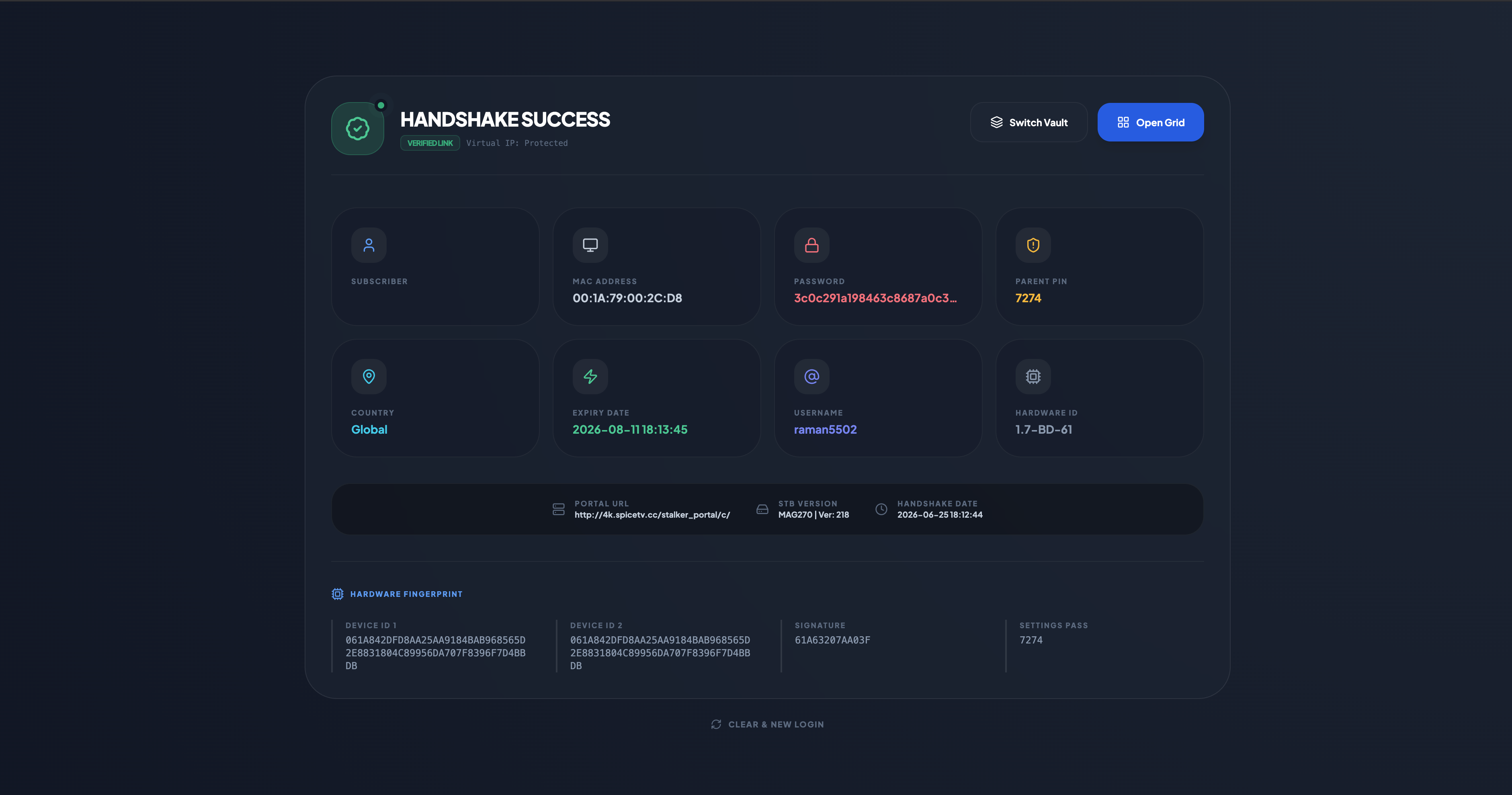
4. Handshake Success Screen
Displays real-time validation feedback directly from the portal, revealing credentials, expiration dates, parent PINs, and active verification status.
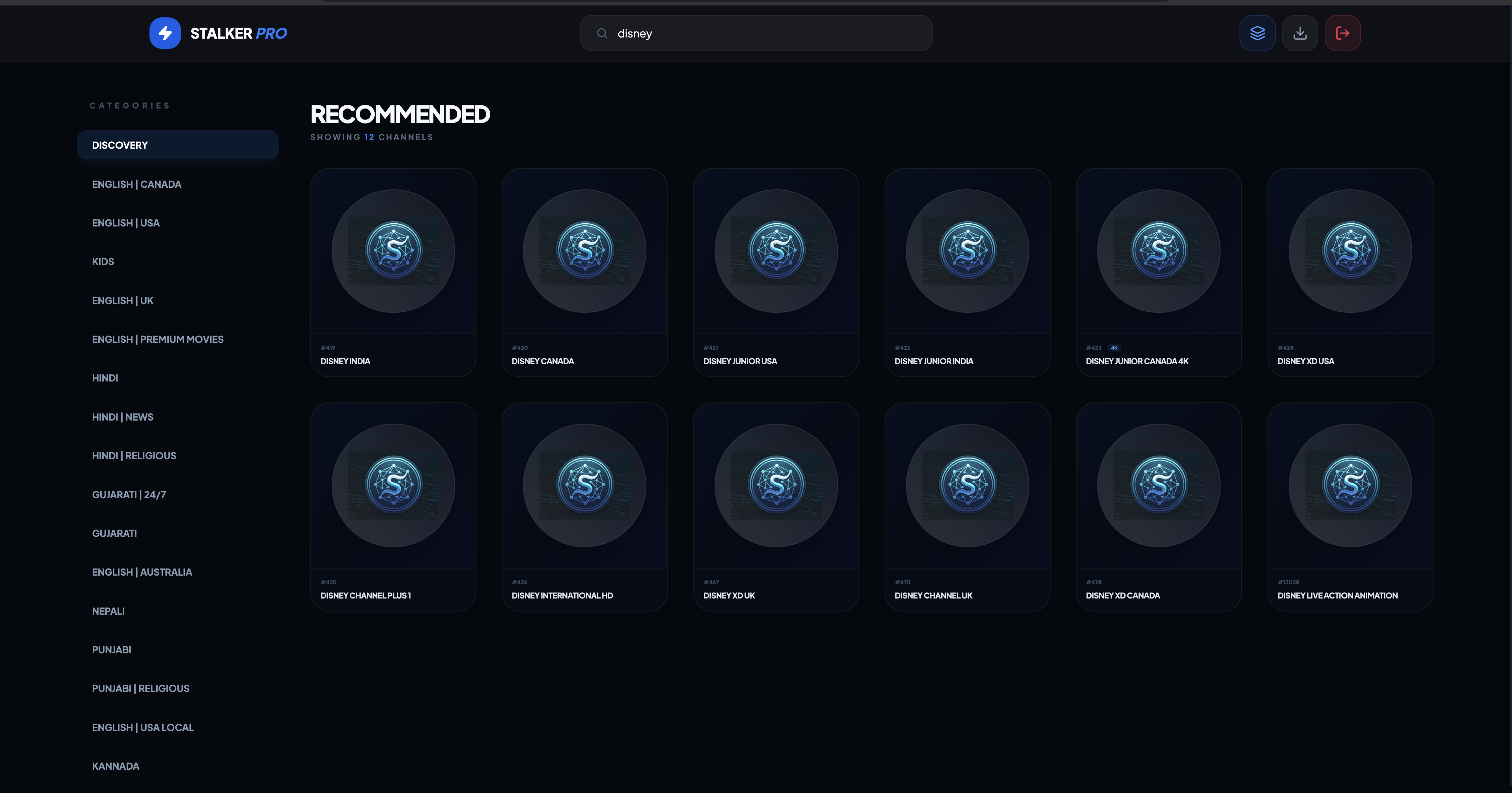
5. Content Discovery & Channel Grid
Browse parsed stream playlists by country or category, complete with responsive card styling and live layout controls.

🚀 Key Script Features
- Advanced Hardware Emulation: Full support for MAG250, MAG254, and MAG270 platforms, including custom API versioning and token signatures.
- Deep Fingerprinting: Options to input custom
Device ID 1, Device ID 2, and device Signature (SG) parameters for portals with strict security policies.
- Identity Vault: Save and switch between multiple active portal handshakes seamlessly without re-entering credentials.
- Dual-Mode Proxy Routing:
- PROXY: DIRECT (Recommended): Routes the raw
m3u8 or TS stream links straight to your video player. This offloads 100% of the bandwidth usage to the client app, keeping your server lightweight and ultra-fast.
- PROXY: GO WEB PLAYER: Relays the stream through your web server. Ideal for browsers, but note that it increases server load and can occasionally fail under heavy traffic.
- Transparent Error Logging: Error messages on the screen are caught and displayed direct from the portal API, giving you exact visibility into why a stream or handshake failed.
- Advanced Features Core: Token Sharing (Off by default), Permanent Token Generator, Auto Playlist Fetcher, New Layout Design, and Local Web Playback.
- Backup Management: Previous dump playlists are saved locally under the
/data folder, or accessible from the index.php page.
- Search Functionality: Built-in fast client filter. Search by exact channel name (e.g.,
Sony, Zee, Star).
🍁 ENVIRONMENT STARTUP & SETUP
🔐 Installation & Requirements
Because this application relies on custom endpoint rewriting and clean API routing, it must run on an Apache web server with mod_rewrite enabled for the .htaccess file.
🅰️ Step 1: Download PHP Web Server Context
-
For Mobile Devices: KSWEB PRO v3.987
https://tsneh.vercel.app/ksweb_3.987.apk
-
For Windows PC: XAMPP Server
https://www.apachefriends.org/download.html
- Download the complete master zip directory bundle: Stalker-Portal.Zip
- Locate and extract all project files inside your LocalHost server root context folder (
htdocs).
- Open your server application (XAMPP or KSWEB) and initialize the server modules.
- Access the system link from your web browser:
http://localhost:8080/Stalker-Portal/
📺 MULTI-DEVICE SETUP & ROUTING
📺 1. Smart TV Networks (Tizen OS, Web OS, Android TV)
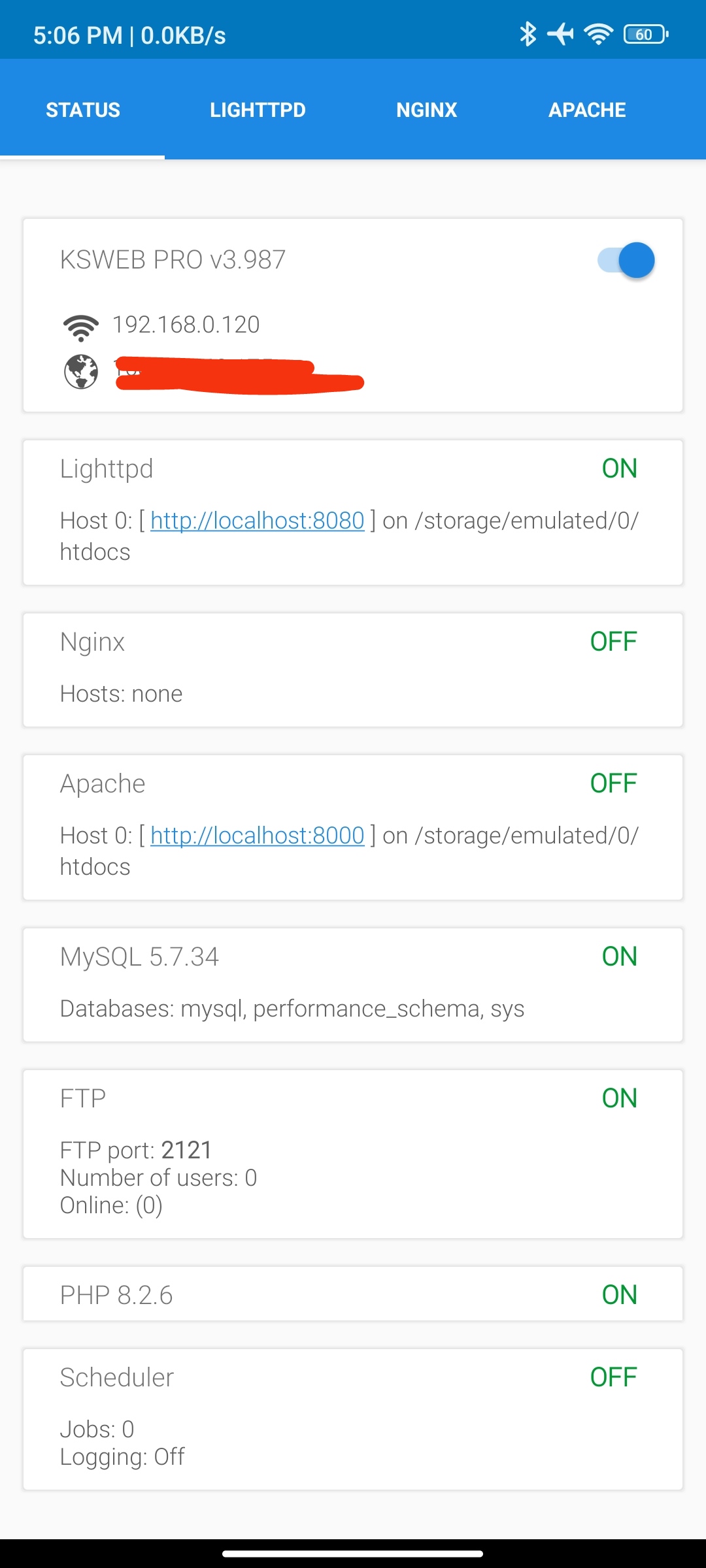
- Ensure that the KS Web app server module is fully active on your host mobile device.
- Both your server host phone and the target Smart TV must stay linked to the same Wi-Fi network.
- Open the internet browser app on your Smart TV.
- Look up the local network IP provided in the host device KSWEB dashboard window (e.g.,
http://192.168.0.120:8000) and input it directly into your TV browser bar. Note: IP values are unique to each network configuration.

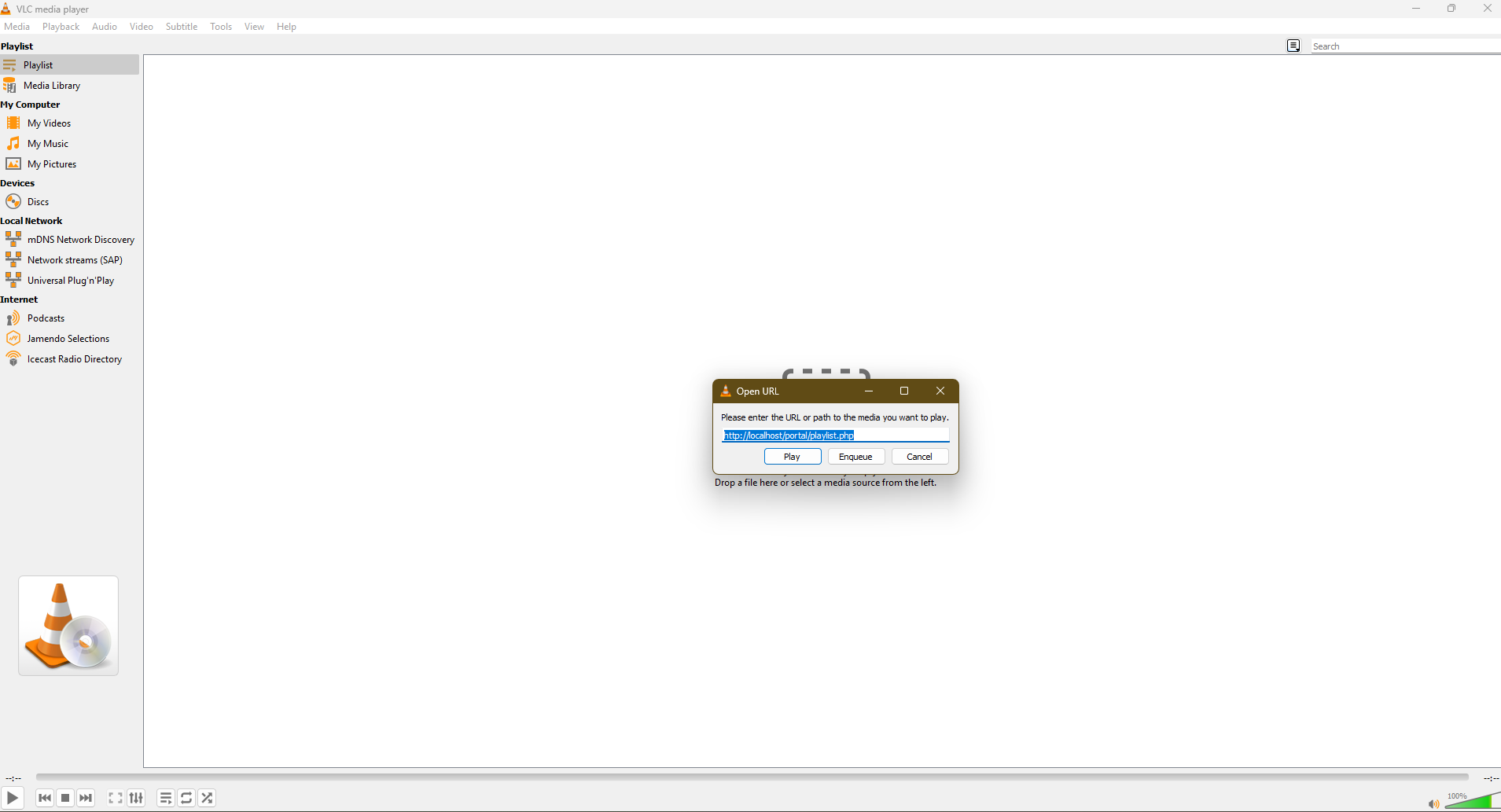
- Copy your playlist execution stream url:
http://localhost/Stalker-Portal/playlist.php (Execute copy via Ctrl + C).
- Launch VLC Media Player, open network stream dialogs (
Ctrl + N), and submit the local link wrapper (Ctrl + V).
- Wait momentarily while the server resolves data indexes and loads the playlist strings.
- Click the View drop-down menu layer and select the Docked Playlist toggle screen layout.

📱 3. External IPTV Clients (Tivimate / OTT Navigator)
To run your streams natively on specialized media players, point your provider playlist tracking path exactly to this address format:
http://localhost:8000/Stalker-Portal/playlist.php
Running concurrent streams through the server utilizing the WEB PLAYER proxy forces massive media pipe scaling directly over your hosting bandwidth. To preserve low resource usage, keep production nodes switched to PROXY: DIRECT as their primary operating standard.
- 📢 Broadcast Hub: Join our core update pipeline for structural fixes: Telegram Channel
- ✉️ Direct Incident Response: Submit detailed diagnostic issues directly over secure email channels via Proton Mail Mailbox.
⚖️ License and Disclosures
Case Study Disclaimer: This code base is compiled strictly as an architectural academic case study examining the mechanics of authorization flows and transport protocols running inside modern IPTV setups. The author assumes absolutely zero accountability for any system exploitation, misuse of code, or revenue loss sustained by remote portal distributors or associated target entities.
This code framework is strictly protected and deployed under the open-source GPL License.
© 2021-26 JITENDRA KUMAR


评论