Best View in Dark Mode (Recommended)

🏝️ Smart AI Resume Analyzer 🏝️
Your Intelligent Career Partner
 Smart AI Resume Analyzer is your all-in-one tool to analyze, optimize, and craft resumes that stand out, helping you land your dream job.
📊 GitHub Stats
🔗 Helpful Links
 What Makes Us Different?
Next-Level Features for Success:
-
🕵️ Deep Resume Analysis:
- 🛡️ ATS Compatibility Score
- 🔑 Keyword Gap Analysis
- 🧩 Role-specific Feedback
- 📊 Skills Gap Breakdown
-
🎨 AI-Powered Resume Builder:
- Themes that Shine (Modern, Minimal, Professional, Creative)
- Smart Content Suggestions
- ATS-Optimized Formatting
- Customizable Sections
-
🤖 AI Optimization Engine:
- 💡 Keyword Highlighting
- ✍️ Content Enhancement Tips
- 🌟 Industry-Specific Insights
🎉 Why Use Smart Resume AI?
Get real-time feedback, boost your resume’s impact, and maximize your chances of getting shortlisted—all with a sleek and intuitive interface.
 Live Demo
👨💻 Try it Now: 
 Tech Stack
🌐 Frontend
| 🌟 Technology |
💼 Role |
| Streamlit |
Builds interactive and user-friendly web apps for resume analysis. |
| HTML |
Provides the basic structure for web pages. |
| CSS |
Adds styling and layouts to the frontend. |
| JavaScript |
Enables interactivity and dynamic behavior for the web pages. |
⚙️ Backend
| 🌟 Technology |
💼 Role |
| Streamlit |
Handles backend logic and integrates machine learning models. |
| Python |
Provides core programming language for implementing functionalities. |
🗄️ Database
| 🌟 Technology |
💼 Role |
| SQLite3 |
Stores and retrieves resume data for efficient processing. |
📦 Modules
| 🌟 Technology |
💼 Role |
| spaCy |
Enhances NLP for keyword analysis and ATS compatibility checks. |
| Python-docx |
Enables Word document editing for resume customization. |
| PyPDF2 |
Processes PDF files for extracting and analyzing resumes. |
| scikit-learn |
Drives machine learning models for resume optimization. |
| Plotly |
Creates interactive charts for skills gap and keyword analysis. |
| NLTK |
Provides tools for tokenization, stemming, and text preprocessing in NLP. |
| openpyxl |
Facilitates reading, writing, and modifying Excel files for data visualization and export. |
💡 How It Works
-
Upload or Start from Scratch
- Import your resume in PDF/Word or create one from scratch with our AI-powered builder.
-
Analyze Your Resume
- ATS Compatibility: Ensure your resume meets recruiter expectations.
- Keyword Insights: Find and fill gaps in your content.
- Skills Gap Analysis: Discover key skills missing for your target role.
-
Build a Stunning Resume
- Select from 4 unique templates and customize sections like skills, achievements, or hobbies.
-
Download & Apply
- Export your resume in PDF format, ready for submission. This project has evolved with significant enhancements to its resume analysis capabilities:
Follow these steps to run Smart Resume AI:
Setup Instructions 🛠️
Follow the steps below to set up and run the Smart AI Resume Analyzer on your local machine.
- Clone the repository:
Open a terminal and run:
git clone https://github.com/Hunterdii/resume-analyzer-ai.git
cd Smart-AI-Resume-Analyzer
- Create a Virtual Environment(Optional)
Set up a virtual environment to manage dependencies:
python -m venv venv
Activate the Virtual Environment:
- Windows:
venv\Scripts\activate
- MacOS & Linux:
source venv/bin/activate
- Install dependencies:
Install the required Python packages:
pip install -r requirements.txt
- Download the spaCy model:
Ensure that the necessary NLP model is installed:
python -m spacy download en_core_web_sm
Congratulations 🥳😱 your set-up 👆 and installation is finished 🥳😱
- Configure Environment Variables (Mandatory for AI-Analyzer Functionality):
To enable access to the Gemini API used by the AI Resume Analyzer, you need to set up environment variables securely.
✅ Step-by-Step:
- Create a
.env file inside the utils/ directory.
- Paste your Google Gemini API key in the following format:
📄 Example content for utils/.env:
GOOGLE_API_KEY=your_google_gemini_api_key
 Get your Gemini API Key:
Visit Google AI Studio – Gemini API Access 👉 Grab and use your own API key — Since Mine One Have Usage Limits.
- Run the application:
Start the application using Streamlit:
streamlit run app.py
📁 Folder Structure After Adding .env
🔐 Important:
- Do not commit your
.env file to version control (e.g., GitHub). It should be listed in .gitignore.
- If you’re collaborating, you can provide a safe
.env.example file with dummy data.
| 🗂️ Folder Structure Preview 1 |
🗂️ Folder Structure Preview 2 |
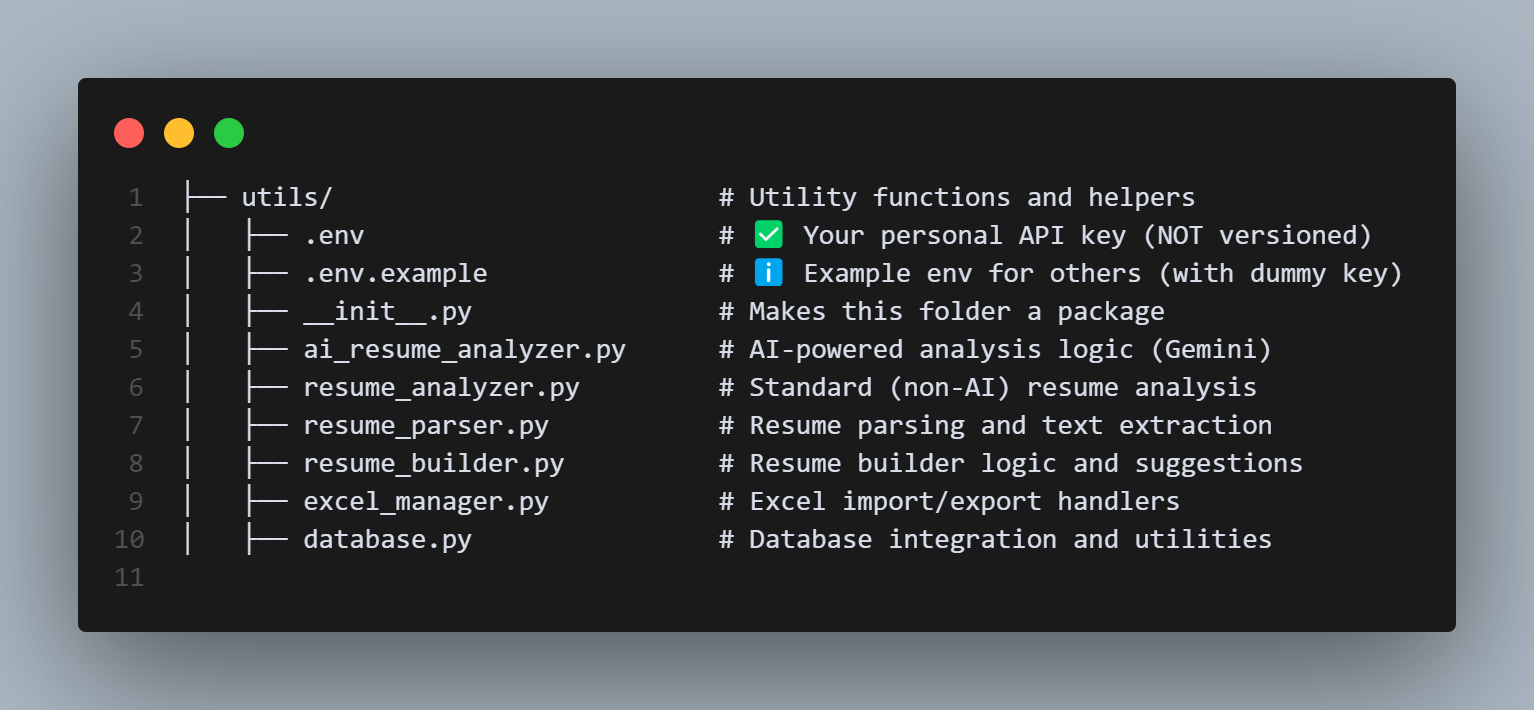
|
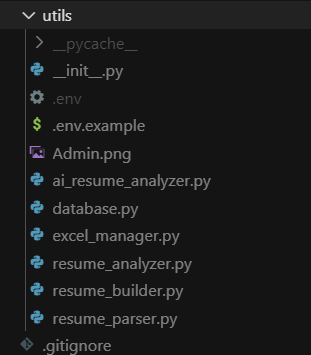
|
Admin Login Credentials
🔹 New Login Credentials:
[email protected]
admin123
🔹 Admin Panel Access:
- The Admin Section will be visible only after login, right below the Dashboard section.
Known Bug 🚨 Autofill Glitch in Resume Builder!
What’s Happening? 🤔
If you’re using the Browser’s (e.g., Chrome, Edge, etc.) Autofill feature to quickly fill out your Name, Email, and Phone details in our Smart AI Resume Analyzer, you might encounter this error in generating Resume:
“⚠️ Please enter your email address.”
Even though the email field appears to be filled, this is a small bug in the Resume Builder Feature where our system doesn’t always recognize inputs from autofill.
Quick Fix 🛠️
Don’t worry—it’s a simple fix!
- Edit the email(or Any) field manually:
- Remove one character or number.
- Type it back in.
- Voilà! The error will disappear, and you can generate your resume smoothly.
(“Voilà” means “there you have it!” or “problem solved!”)
Why Does This Happen? 🌐
This is a known issue with the resume builder feature, where the autofill behavior of browsers (e.g., Chrome, Edge, etc.) doesn’t trigger the necessary validation for some input fields. By manually editing the email, the system recognizes it correctly.
We’re actively working on a permanent fix to ensure your experience is seamless. Thank you for your understanding and support! 🙏
🎯 Why Choose Smart Resume AI?
✨ Tailored for You
Your resume is optimized for the job you’re aiming for, using role-specific insights.
🖼️ Stunning Templates
Choose from polished and modern templates that stand out at first glance.
⚡ Time-Saving Automation
AI does the heavy lifting, helping you create a winning resume in minutes.
📈 Better Chances, Every Time
Get actionable feedback and align your resume to job descriptions effortlessly.
 Contributing
Join the mission! Here’s how:
- Fork the repository.
- Create a new branch for your feature:
git checkout -b feature-name.
- Push changes and submit a Pull Request.
 Why Users Love Smart Resume AI
- Saves Time: Create a stunning resume in minutes.
- Increases Job Opportunities: Tailor your resume to any role.
- Professional Output: Choose from modern and polished designs.
- Boosts Confidence: Optimized, recruiter-ready resumes.
Features That Set Us Apart
| Feature |
Description |
| 🔍 Resume Analysis |
Get an ATS score, identify keyword gaps, and find skills to add for role alignment. |
| ✨ Customizable Templates |
Choose from 4 sleek designs: Modern, Minimal, Professional, Creative. |
| 📈 AI-Driven Insights |
Receive smart suggestions for optimizing content, formatting, and keywords. |
| 🎯 Role-specific Guidance |
Tailored recommendations for matching job descriptions and standing out in applications. |
🎥 Quick Glance
🎥 Quick Glance – Version 2.0 (AI-Powered Resume Analyzer)
Note: Time Taking For scraping so have Patience
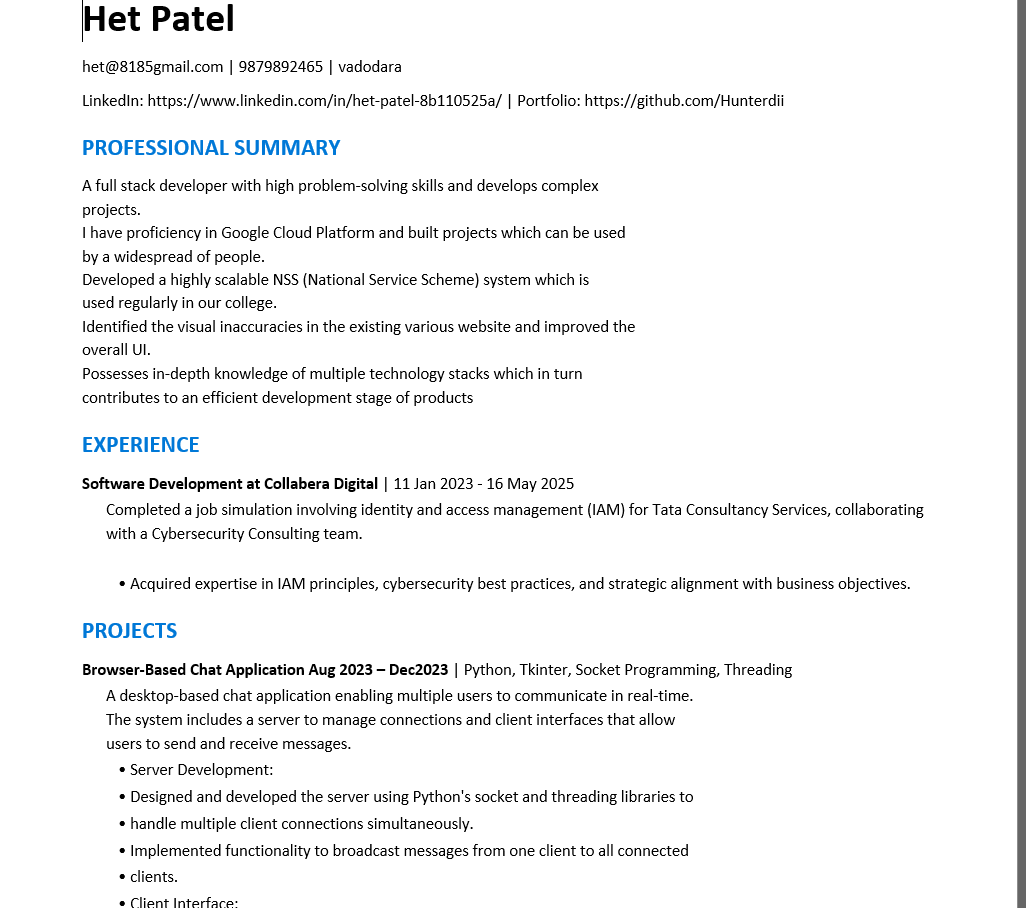
🎨 Interactive Resume Templates
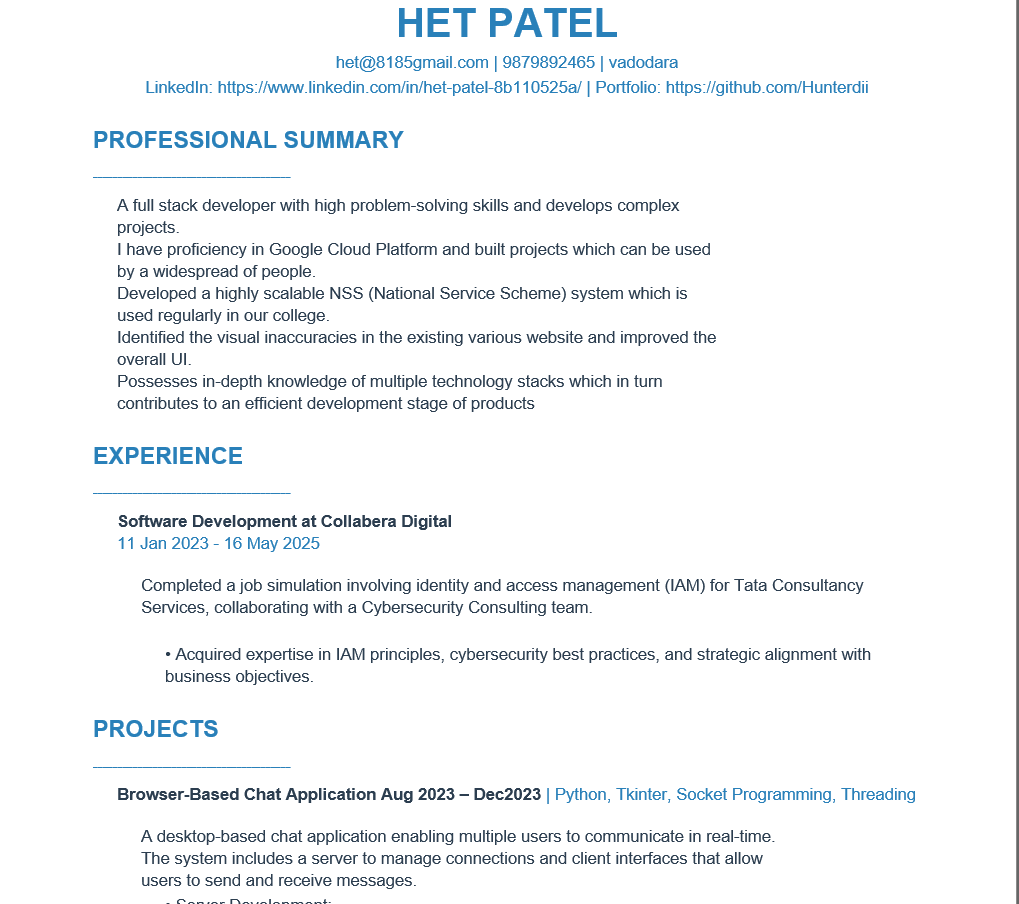 |
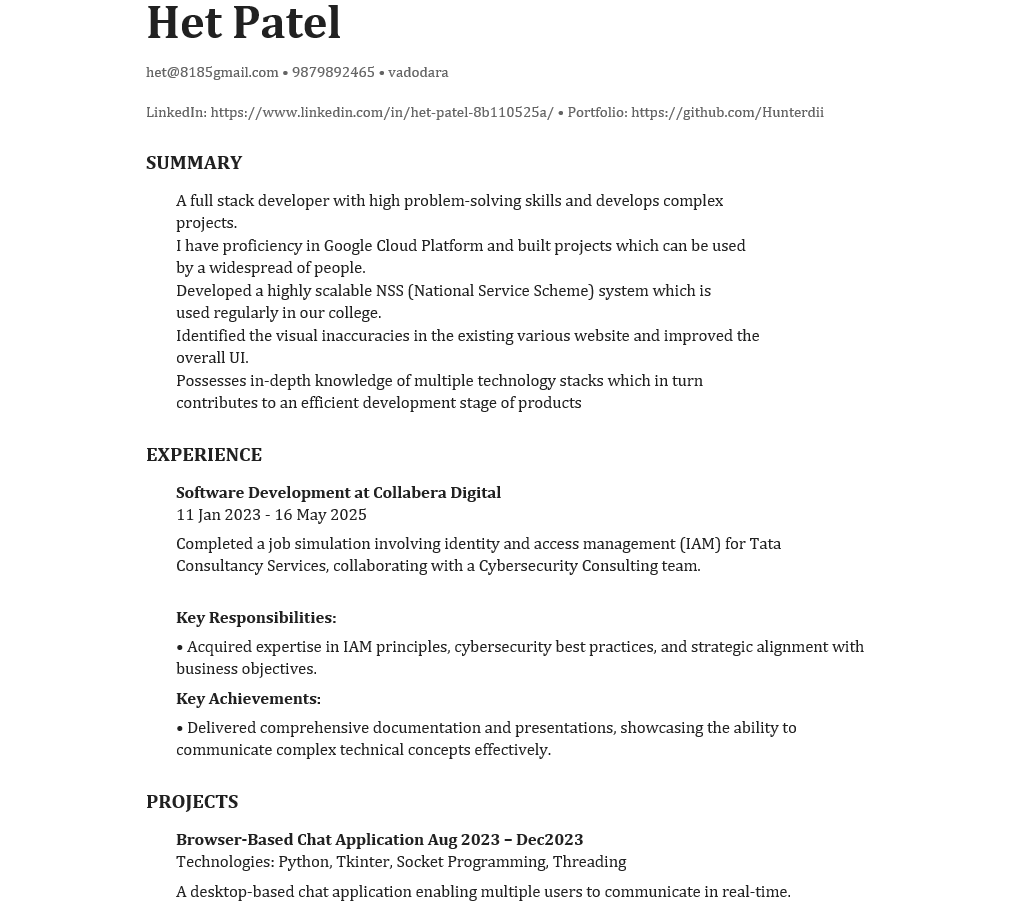 |
| Modern Template - Polished & stylish |
Minimal Template - Clean & elegant |
 |
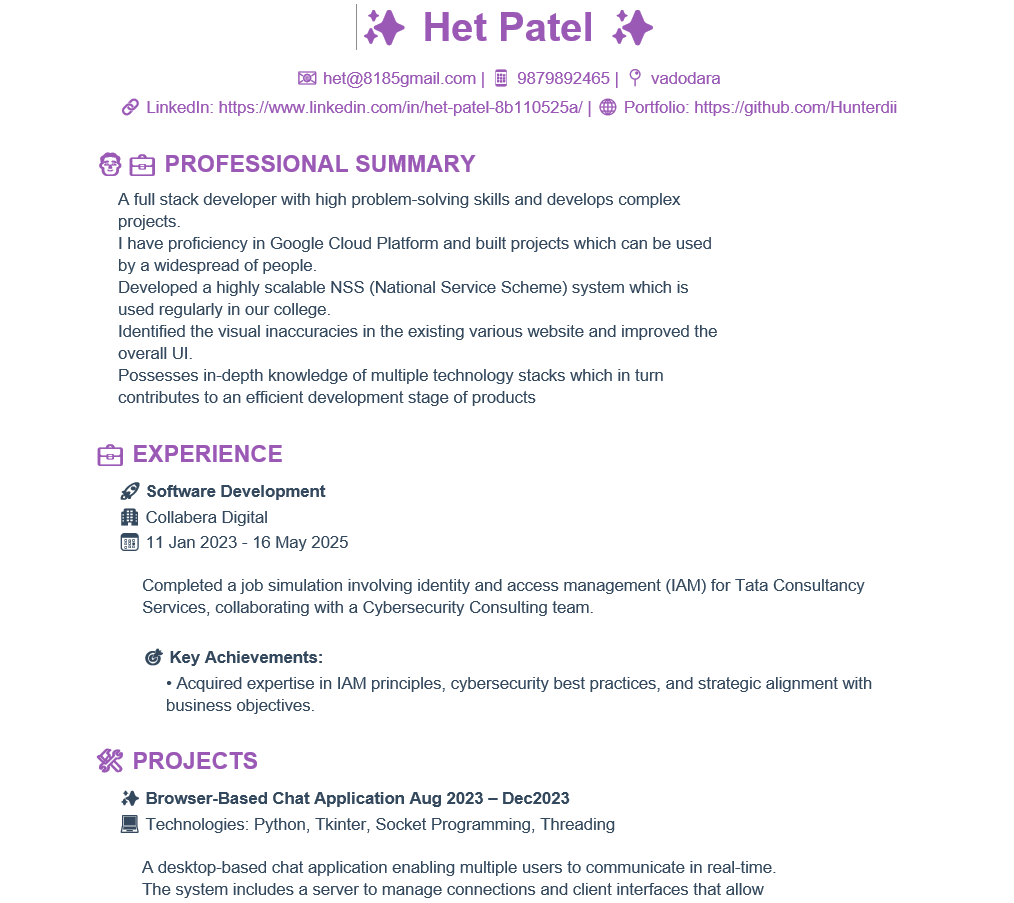 |
| Professional Template - Industry-standard |
Creative Template - Unique & visually appealing |
📄 License
This project is licensed under the MIT License.
🌟 GitHub Repo
Explore the code, contribute, or drop a  : Smart Resume AI Repository
🛡️ Maintainer
This repository is maintained by Hunterdii.
Have suggestions? Feel free to reach out to me via email. 📧
📰 News
Practice, practice, practice! Keep working hard, and it will all fall into place. No shortcuts in this Field! 🛠️
Stay curious and keep learning. 🚀
💖 How You Can Support
If you appreciate this repository and want to show your support, you can do so through these platforms:
| ❤️ Platform |
🌟 Support Link |
| GitHub Sponsors |
 |
| Buy Me a Coffee |
 |
| Thanks.dev |
 |
Thank you for your support! Every bit helps keep this repository going. 🌈✨


评论