OpenWebUI Extensions

English | 中文
A collection of enhancements, plugins, and prompts for open-webui, developed and curated for personal use to extend functionality and improve experience.

| 👤 Author |
👥 Followers |
⭐ Points |
🧩 Plugin Contributions |
| Fu-Jie |
 |
 |
 |
| 📝 Posts |
⬇️ Plugin Downloads |
👁️ Plugin Views |
👍 Upvotes |
💾 Plugin Saves |
 |
 |
 |
 |
 |
🔥 Top 6 Popular Plugins
📈 Total Downloads Trend
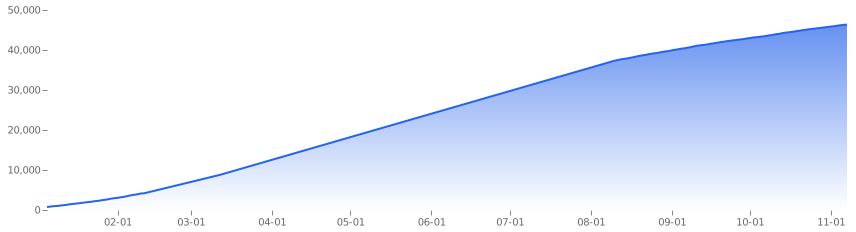
See full stats and charts in Community Stats Report
🌟 Star Features
The ultimate autonomous Agent integration for OpenWebUI. Deeply bridging GitHub Copilot SDK with your OpenWebUI ecosystem. It enables the Agent to autonomously perform intent recognition, web search, and context compaction while reusing your existing tools, skills, and configurations for a professional, full-featured experience.
No GitHub Copilot subscription required! Supports BYOK (Bring Your Own Key) mode using your own OpenAI/Anthropic API keys.
🚀 Key Leap (v0.13.1)
- 🔌 OpenWebUI 0.9.x Dual Compatibility (Critical): All OpenWebUI model/config/tool APIs now transparently support both sync (pre-0.9) and async (0.9.x) interfaces. No version branching required; the plugin auto-detects and adapts.
- 🚀 Internal Methods Promoted to Async:
_read_tool_server_connections, _build_openwebui_request, and _parse_mcp_servers are now async def, eliminating thread-offload patterns that break under 0.9.x.
- 🛡️ Sync-Safe Valve Options:
Valves and UserValves option providers (sync classmethods) now use a compatibility wrapper so search_models calls remain safe in both sync and async contexts.
- 🐛 File Publish Path Fixed:
publish_file_from_workspace now uses a typed compatibility layer instead of raw asyncio.to_thread, resolving silent crashes when Files methods became coroutines in 0.9.x.

The Agent Team architecture enables autonomous task scheduling with Parallel, Serial, and Solo execution modes, driven by the persistent Autopilot engine.
[!TIP]
💡 Pro Tip: Enhanced Visualization
We highly recommend asking the Agent to install the Visual Explainer skill during your conversation. It dramatically improves the aesthetics and interactivity of generated HTML Artifacts. Simply tell the AI:
“Please install this skill: https://github.com/nicobailon/visual-explainer” to get started.
📺 Demo: Visual Skills & Data Analysis

In this demo, the Agent installs a visual enhancement skill and automatically generates an interactive dashboard from World Cup data.

Combined with the Excel Expert skill, the Agent can automate complex data cleaning, multi-dimensional statistics, and generate professional data dashboards.
🌟 Featured Real-World Cases
- GitHub Star Forecasting: Automatically parsing CSV data, writing analysis scripts, and generating interactive growth dashboards.
- Video Optimization: Direct control of system-level tools (FFmpeg) to accelerate and compress media with professional color optimization.
Experience interactive thinking. Seamlessly transforms complex chat sessions into structured, clickable mind maps for better visual modeling and rapid idea extraction.

Professional data storytelling. Converts raw information into sleek, boardroom-ready infographics powered by AntV, perfect for summarizing long-form content instantly.

High-fidelity reporting. Export conversation history into professionally formatted Word documents with preserved headers, code blocks, and math formulas.
Maximize your context window. Intelligently compresses chat history using LLM logic to save tokens and costs while maintaining a high-quality reasoning chain.
Faster plugin onboarding across community repositories. Pull plugins from multiple GitHub repositories in one request, then narrow the result set inside an interactive dialog with repository tags, type filters, keyword search, and descriptions before installing only the subset you want.

A single install dialog can merge multiple repositories and let you filter visually before anything is installed.
📦 Project Contents
🧩 Plugins (Actions, Filters, Pipes, Pipelines)
Located in the plugins/ directory, containing Python-based enhancements:
Actions
- Smart Mind Map (
smart-mind-map): Generates interactive mind maps from text.
- Smart Infographic (
infographic): Transforms text into professional infographics using AntV.
- Flash Card (
flash-card): Quickly generates beautiful flashcards for learning.
- Deep Dive (
deep-dive): A comprehensive thinking lens that dives deep into any content.
- Export to Excel (
export_to_excel): Exports chat history to Excel files.
- Export to Word (
export_to_docx): Exports chat history to Word documents.
- Smart Mind Map Tool (
smart-mind-map-tool): The tool version of Smart Mind Map, enabling AI proactive/autonomous invocation.
- OpenWebUI Skills Manager Tool (
openwebui-skills-manager-tool): Native tool for managing OpenWebUI skills.
- Batch Install Plugins from GitHub (
batch-install-plugins): Discovers plugins from multiple GitHub repositories and installs them through an interactive repository/type-filtered selection dialog.
Filters
- GitHub Copilot SDK Files Filter (
github_copilot_sdk_files_filter): Essential companion for Copilot SDK. Bypasses RAG to ensure full file accessibility for Agents.
- Web Gemini Multimodal Filter (
web_gemini_multimodel_filter): Adds multimodal capabilities (PDF, Video, Office) to any model with intelligent routing.
- Async Context Compression (
async-context-compression): Optimizes token usage via context compression.
- Context Enhancement (
context_enhancement_filter): Enhances chat context.
- Folder Memory (
folder-memory): Automatically extracts project rules from conversations and injects them into the folder’s system prompt.
- Markdown Normalizer (
markdown_normalizer): Fixes common Markdown formatting issues in LLM outputs.
Pipes
- GitHub Copilot SDK (
github-copilot-sdk): Official GitHub Copilot SDK integration (v0.13.2). Supports OpenWebUI 0.9.x compatibility, BYOK model priority, dynamic models (GPT-4o, Claude 3.7, o1), multi-turn conversation, and high-performance process pooling.
Pipelines
- Wisdom Synthesizer (
wisdom_synthesizer): An external pipeline filter that refactors aggregate requests with collective wisdom to output structured expert reports.
🎯 Prompts (System Prompts for various roles)
System Prompts are managed in the docs/prompts/ directory:
- Prompt Library: A curated collection of fine-tuned prompts for Coding, Marketing, and Analysis.
🛠️ Extensions
Standalone frontend extensions to supercharge your Open WebUI:
 : An all-in-one prompt management suite featuring AI-powered prompt generation, spotlight-style quick search, and advanced category organization.

📖 Documentation
Located in the docs/en/ directory:
- Plugin Development Guide - The authoritative guide covering everything from getting started to advanced patterns and best practices. ⭐
For code examples, please check the docs/examples/ directory.
🚀 Quick Start
This project is a collection of resources and does not require a Python environment. Simply download the files you need and import them into your OpenWebUI instance.
Using Plugins
-
Install from OpenWebUI Community (Recommended):
- Visit my profile: Fu-Jie’s Profile
- Browse the plugins and select the one you like.
- Click “Get” to import it directly into your OpenWebUI instance.
-
Quick Install All Plugins: To install all plugins to your local OpenWebUI instance at once, clone this repo and run python scripts/install_all_plugins.py after configuring your API key in .env — see Deployment Guide for details.
Using Prompts
- Browse the
/prompts directory and select a prompt file (.md).
- Copy the file content.
- In the OpenWebUI chat interface, click the “Prompt” button above the input box.
- Paste the content and save.
Contributing
If you have great prompts or plugins to share:
- Fork this repository.
- Add your files to the appropriate
prompts/ or plugins/ directory.
- Submit a Pull Request.
Contributing
Contributors ✨
Thanks goes to these wonderful people (emoji key):
This project follows the all-contributors specification. Contributions of any kind welcome!


评论