
A Farm Yard example scene of how to use VRTK v4 for rapidly building spatial computing solutions in the Unity software.
Requires the Unity software version 2020.3.24f1.




Beta Disclaimer
This project was built using 2020.3.24f1 and should work as expected on that version. It is feasible to downgrade this project to a previous version of the Unity software but it may cause issues in doing so.
This project uses the newer Unity software XR management system and the newer Unity Input system.
This VRTK v4 Farm Yard example project has been updated to use the latest Tilia packages but is still in development and is missing a number of features from the previous release that used the deprecated VRTK.Prefabs package.
The current missing features are:
These features will be added in due course.
If you want to get started with the Tilia repos then check out the Bowling Tutorial.
Introduction
VRTK aims to make building spatial computing solutions in the Unity software fast and easy for beginners as well as experienced developers.
You do not need to download anything else to get this Unity project running, simply open the downloaded Unity project in the Unity software as outlined by the Getting Started guide below.
Getting Started
Downloading the project
- Download this project repository to your local machine using one of the following methods:
- Git clone the repository with
git clone https://github.com/ExtendRealityLtd/VRTK.git
- Download the zip file at
https://github.com/ExtendRealityLtd/VRTK/archive/master.zip and extract it.
Opening the downloaded project in the Unity software
Do not drag and drop the VRTK project download into an existing Unity project. The VRTK repository download is a Unity project already and you should not nest a Unity project inside another Unity project. Follow the instructions below for opening the VRTK project within the Unity software.
Using the Unity Hub
- Open the Unity Hub panel.
- Click the
Add Button:

- Browse to the local directory where the repository was downloaded to and click
Select Folder:
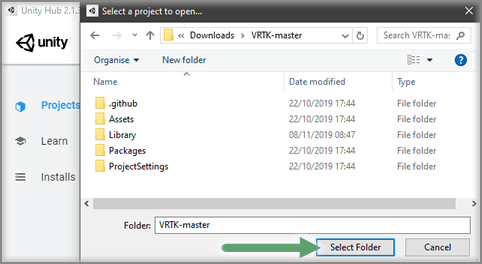
- The VRTK project will now show up in the Unity Hub project window, so select it to open the VRTK project in the Unity software:

- The VRTK project will now open within the Unity software.
Opening from within the Unity software
- Select
Main Menu -> File -> Open Project within the Unity software.
- Browse to the local directory where the repository was downloaded to and click
Select Folder.
- The VRTK project will now open within the Unity software.
Running the example scene
- Open the
Assets/Samples/Farm/Scenes/ExampleScene scene.
- Enable
Maximize On Play in the Unity Game view control bar to ensure no performance issues are caused by the Unity Editor overhead.
- Play the scene in the Unity Editor (
CTRL + P).
- The scene should automatically play within any Unity supported XR hardware.
- Explore the farm yard and enjoy!
Made With VRTK




Many games and experiences have already been made with VRTK.
Check out the Made With VRTK website to see the full list.
Contributing
If you have a cool feature you’d like to show off within the Farm Yard that can be implemented with the base Tilia packages then feel free to raise a pull request with your contribution.
Please refer to the Extend Reality Contributing guidelines and the project coding conventions.
Third Party Pacakges
The VRTK v4 Farm Yard example project uses the following 3rd party package:
License
Code released under the MIT License.
Disclaimer
These materials are not sponsored by or affiliated with Unity Technologies or its affiliates. “Unity” is a trademark or registered trademark of Unity Technologies or its affiliates in the U.S. and elsewhere.


评论