
NavigationTabStrip
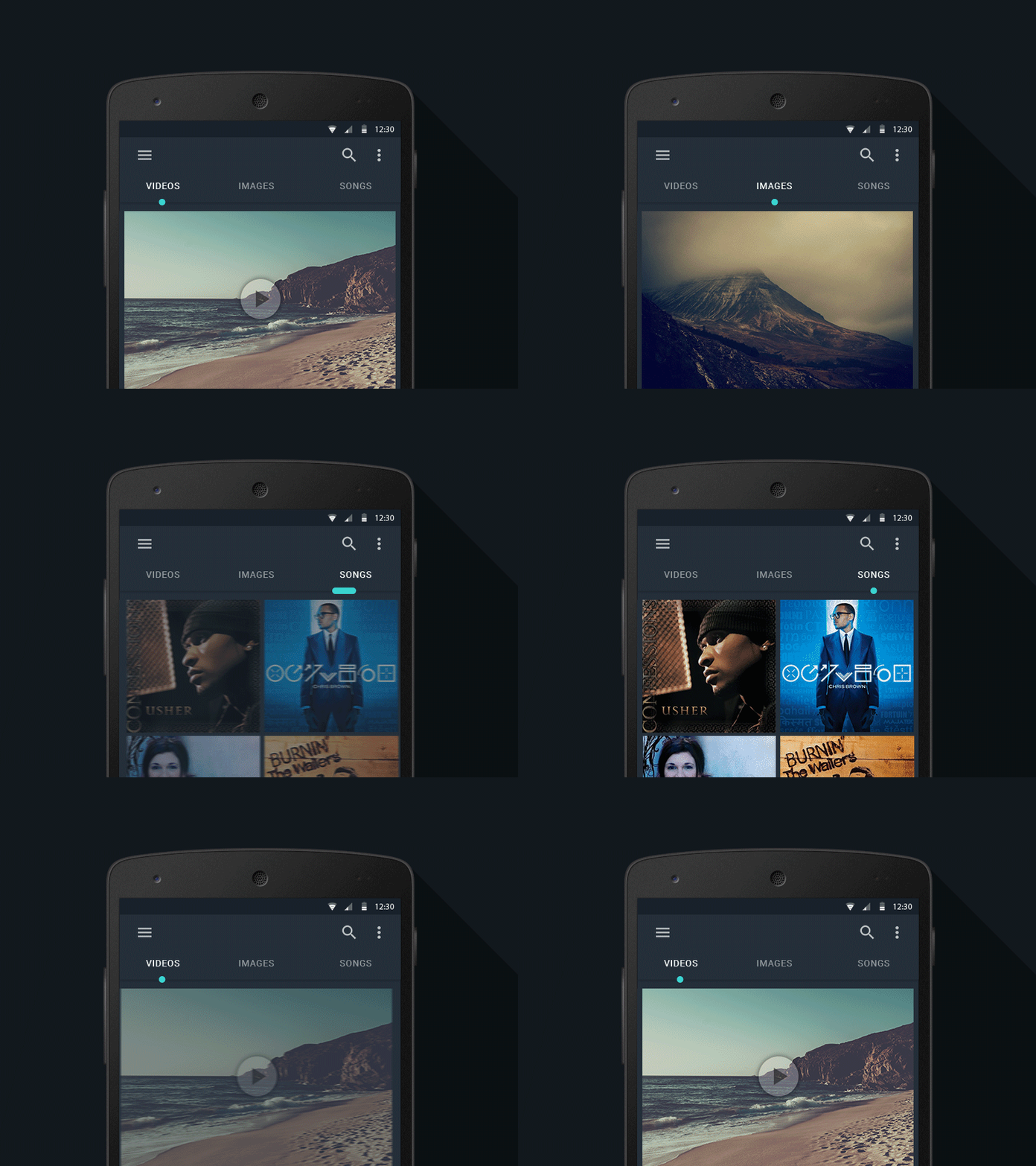
Navigation tab strip with smooth interaction.


You can check the sample app here.
Warn
This library is not more supported.
If you want to add new feature or fix a bug, grab source code and do it.
If you think your fix or feature would be useful to other developers,
I can add link of your repository to this README file.
Thank you for using our libraries.
Download
You can download a .aar from GitHub’s releases page.
Or use Gradle jCenter:
dependencies {
    repositories {
        mavenCentral()
        maven {
            url  'http://dl.bintray.com/gigamole/maven/'
        }
    }
    implementation 'com.github.devlight.navigationtabstrip:navigationtabstrip:+'
}
Or Gradle Maven Central:
compile 'com.github.devlight.navigationtabstrip:navigationtabstrip:1.0.4'
Or Maven:
<dependency>
    <groupId>com.github.devlight.navigationtabstrip</groupId>
    <artifactId>navigationtabstrip</artifactId>
    <version>1.0.4</version>
    <type>aar</type>
</dependency>
Android SDK Version
NavigationTabStrip requires a minimum SDK version of 11.
Sample
Parameters
For NTS you can set such parameters as:
-
color:
allows you to set strip color.
-
size:
allows you to set titles size. By default NTS use auto titles size.
-
weight:
allows you to set weight(height) of strip.
-
factor:
allows you to set strip resize factor.
-
titles:
allows you to set NTS titles. This is your tabs.
-
type:
allows you to set strip type - line or point.
-
gravity:
allows you to set strip gravity - top or bottom.
-
view pager:
allows you to connect NTS with ViewPager. If you want your can also set OnPageChangeListener.
-
typeface:
allows you to set custom typeface to your titles.
-
corners radius:
allows you to set corners radius of strip.
-
animation duration:
allows you to set animation duration.
-
inactive color:
allows you to set inactive titles color.
-
active color:
allows you to set active title color.
-
tab strip listener:
allows you to set listener which triggering on start or on end when you set tab index.
Tips
If your set ViewPager you can action down on active tab and do like drag.
NTS use only upper case titles.
Init
Check out in code init:
final NavigationTabStrip navigationTabStrip = (NavigationTabStrip) findViewById(R.id.nts);
navigationTabStrip.setTitles("Nav", "Tab", "Strip");
navigationTabStrip.setTabIndex(0, true);
navigationTabStrip.setTitleSize(15);
navigationTabStrip.setStripColor(Color.RED);
navigationTabStrip.setStripWeight(6);
navigationTabStrip.setStripFactor(2);
navigationTabStrip.setStripType(NavigationTabStrip.StripType.LINE);
navigationTabStrip.setStripGravity(NavigationTabStrip.StripGravity.BOTTOM);
navigationTabStrip.setTypeface("fonts/typeface.ttf");
navigationTabStrip.setCornersRadius(3);
navigationTabStrip.setAnimationDuration(300);
navigationTabStrip.setInactiveColor(Color.GRAY);
navigationTabStrip.setActiveColor(Color.WHITE);
navigationTabStrip.setOnPageChangeListener(...);
navigationTabStrip.setOnTabStripSelectedIndexListener(...);
Other methods check out in sample.
And XML init:
<com.gigamole.navigationtabstrip.NavigationTabStrip
    android:layout_width="match_parent"
    android:layout_height="50dp"
    app:nts_color="#000"
    app:nts_size="15sp"
    app:nts_weight="3dp"
    app:nts_factor="2.5"
    app:nts_titles="@array/titles"
    app:nts_type="point"
    app:nts_gravity="top"
    app:nts_typeface="fonts/typeface.otf"
    app:nts_corners_radius="1.5dp"
    app:nts_animation_duration="300"
    app:nts_active_color="#000"
    app:nts_inactive_color="#c4c4c4"/>
Getting Help
To report a specific problem or feature request, open a new issue on Github.
Xamarin
Thanks to Martijn van Dijk for developing Xamarin bindings library for NavigationTabStrip.
Plugin is available on Nuget.
Credits
Author
Created by Basil Miller - @gigamole
Company


Here you can see open source work developed by Devlight LLC.
This and another works is an exclusive property of Devlight LLC.
If you want to use this library in applications which will be available on Google Play, please report us about it or author of the library.
Whether you’re searching for a new partner or trusted team for creating your new great product we are always ready to start work with you.
You can contact us via [email protected] or [email protected].
Thanks in advance.
Devlight LLC, 2016
devlight.io






评论