glyphs



Library for convenient management of bitmap textures from Minecraft resourcepacks.
Vanilla provides you ability to create bitmap fonts with images of bigger sizes (up to 256x256),
but they work as a text - you can’t render texture at the necessary place.
glyphs give the opportunity to make decorated chat messages, menus etc. with absolutely
positioned textures. It based on @unnamed’s “creative” & @Kyori’s “adventure” libraries,
so glyphs is platform-independent.
Examples
Decorated chat message

At the left part of message you can see the texture with Minecraft® logo
(all rights belong to their respective owners, that’s just an example).
How to reproduce
var spaces = MojangSpacesGlyph.create();
var exampleLogo = ImageGlyph.of(Texture.of(
            Key.key(Glyph.DEFAULT_NAMESPACE, "chat/example_logo"),
            GlyphResources.resourceFromJar("example_logo.png")),
        new TextureProperties(/* height */ 50, /* ascent */ 56));

Collection<FileResource> resources = GlyphCompiler.instance()
        .compile(spaces, exampleLogo);

// Method that generates archive with "creative" library
createResourcepack(resources);

// Indent component with 14 spaces
Component logoIndentComponent = Component.text(" ".repeat(14));

// GlyphComponentBuilder#build returns "Component"'s instance from "adventure" library
Component resultComponent = GlyphComponentBuilder.universal(spaces)
        .append(exampleLogo)
        .build()
        .append(Component.newline().append(logoIndentComponent))
        .append(Component.newline()
            .append(logoIndentComponent)
            .append(Component.text("Glyphs", TextColor.fromHexString("#d84aff"),
                TextDecoration.BOLD)))
        .append(Component.newline()
            .append(logoIndentComponent)
            .append(Component.text("<--- ", NamedTextColor.GRAY))
            .append(Component.text("Here you can see Minecraft® logo", NamedTextColor.YELLOW)))
        .append(Component.newline().append(logoIndentComponent))
        .append(Component.newline().append(logoIndentComponent));

// and so on to send it to a player
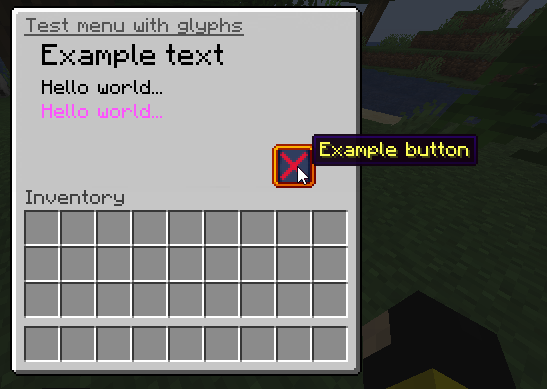
That’s the simple menu with rendered texts of various sizes and the custom button.
How to reproduce
// Glyphs objects
var spaces = MojangSpacesGlyph.create();

var guiBackground = ImageGlyph.of(Texture.of(
            Key.key(Glyph.DEFAULT_NAMESPACE, "gui/gui_background"),
            GlyphResources.resourceFromJar("gui_background.png")),
        new TextureProperties(/* height */ 256, /* ascent */ 19));

var exampleButton = ImageGlyph.of(Texture.of(
            Key.key(Glyph.DEFAULT_NAMESPACE, "gui/example_button"),
            GlyphResources.resourceFromJar("example_button.png")),
        new TextureProperties(/* height */ 22, /* ascent */ -56));

var font = GlyphResources.minecraftFontGlyphCollection(
        List.of(new TextureProperties(/* height */ 12, /* ascent */ -6),
            new TextureProperties(/* height */ 8, /* ascent */ -24),
            new TextureProperties(/* height */ 8, /* ascent */ -36)));

Collection<FileResource> resources = GlyphCompiler.instance()
        .compile(spaces, guiBackground, exampleButton, font);
resources.addAll(GlyphResources.blankSlotResources());

// Method that generates archive with "creative" library
createResourcepack(resources);

// Building component for inventory title
Component titleComponent = GlyphComponentBuilder.gui(spaces)
        .append(guiBackground)
        .append(/* position */ 131, exampleButton)
        .append(/* position */ 16, font.translate(/* height */ 12, /* ascent */ -6, "Example text"))
        .append(/* position */ 16, font.translate(/* height */ 8, /* ascent */ -24, "Hello "))
        .append(PositionType.RELATIVE, font.translate(/* height */ 8, /* ascent */ -24, "world..."))
        .append(PositionType.ABSOLUTE, /* position */ 16, font.translate(/* height */ 8, /* ascent */ -36, "Hello world...", NamedTextColor.LIGHT_PURPLE))
        .build()
        .append(Component.text("Test menu with glyphs", NamedTextColor.DARK_GRAY, TextDecoration.UNDERLINED));

// and so on to open chest GUI
See full code of Bukkit plugin with both examples.
Usage
You need an implementation of Minecraft server with adventure library support.
Also, that’s required Minecraft 1.19 and higher to support all the library features.
Add dependency
glyphs is published to Maven Central repository.
Gradle (releases)
repositories {
    mavenCentral()
}

dependencies {
    // Main dependency with GlyphComponentBuilder and GlyphCompiler
    implementation "ru.brikster:glyphs-api:$version"
    // Optional dependency with some frequently used resources (Minecraft font etc.)
    implementation "ru.brikster:glyphs-resources:$version"
}
Gradle (snapshots)
repositories {
    maven {
        name "ossrh-snapshots"
        url "https://s01.oss.sonatype.org/content/repositories/snapshots/"
    }
}

dependencies {
    // Main dependency with GlyphComponentBuilder and GlyphCompiler
    implementation "ru.brikster:glyphs-api:$version"
    // Optional dependency with some frequently used resources (Minecraft font etc.)
    implementation "ru.brikster:glyphs-resources:$version"
}
You can check out for latest snapshot versions in gradle.properties or at OSSRH Snapshots.


评论