ADAMANT Market-Making Software
Free self-hosted market-making toolkit for token issuers.
Improve your token’s CEX market quality without sending your tokens, funds, or API keys to a third-party market maker.
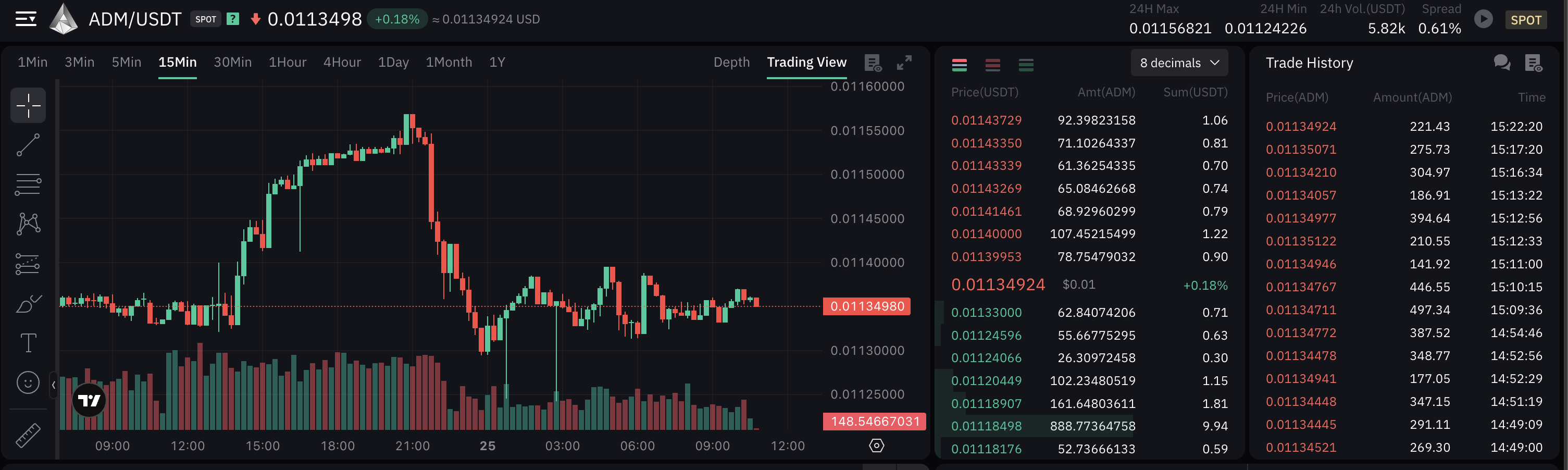
ADAMANT Market-Making Software runs on your own server, uses your own exchange account, and helps maintain order book depth, tighter spreads, price ranges, and live-like market activity on supported centralized exchanges.
No token custody.
No fund transfer.
No third-party API key access.
Full control over configuration, monitoring, and execution.




Why token projects use it
A CEX listing is not enough.
If your order book is thin, the spread is wide, or even small trades move the price too much, new traders may see risk before they see your project.
ADAMANT Market-Making Software helps token issuers operate their own liquidity setup instead of handing control to an external black-box market maker.
It is designed for projects that want to:
- Improve order book depth
- Maintain tighter spreads
- Reduce empty-book and gap effects
- Keep price activity within configured ranges
- Monitor liquidity operations transparently
- Stay in control of their own exchange accounts
- Avoid sending tokens or funds to an outside market maker
Trusted by design
ADAMANT Market-Making Software is not a black-box market-making service.
It is open-source software backed by ADAMANT — a 10-year open-source crypto project with public repositories, long-term community history, and production infrastructure.
Developed and maintained by the ADAMANT developer community and cryptofoundry as part of an open-source blockchain ecosystem developed since 2016.
We build custom crypto software, trading bots, payment systems and blockchain infrastructure. Tell us what to build.
You can inspect the code, run the software yourself, monitor its behavior, and keep your exchange access under your own control.
Who it is for
ADAMANT Market-Making Software is built for:
- Token issuers after CEX listing
- Crypto projects with thin order books or wide spreads
- Teams that want to improve market quality without transferring tokens or funds to a third party
- Projects that prefer open-source, self-hosted, transparent market operations
- Small and early-stage token projects that need a free basic market-making toolkit to start
- Mid-size and large crypto projects that need advanced market-making features, custom exchange support, setup assistance, and ongoing technical support through the premium version
- Teams that cannot afford, do not want, or do not fully trust a traditional full-service market maker
ADAMANT Market-Making Software helps token issuers improve CEX market quality without handing control to a third-party market maker.
It is designed to address the most common problems after listing:
| Situation |
Pain |
| Token is already listed |
But the order book looks empty or weak |
| Spread is too wide |
Traders see risk and avoid entering |
| Liquidity is thin |
Even small orders move the price |
| Full-service market making is too expensive |
Retainers, token loans, opaque terms |
| Team does not trust third parties |
Fear of token dumping, API misuse, or hidden execution |
| Project wants transparency |
The software runs on their own server, under their own monitoring |
What it does
The free basic version helps operate essential market-making activity on supported centralized exchanges.
Basic features
- Self-hosted deployment
- No third-party access to your exchange API keys
- No token or fund transfer to an external market maker
- Initial order book filling
- Dynamic order book building
- Buy and sell limit orders
- Buy and sell market orders
- Spread maintenance
- Basic liquidity and depth support
- Price range settings
- Trading activity with configurable policies:
- Spread
- Order book
- Optimal
- Depth
- Reference price / arbitrage logic across trading pairs or exchanges
- Account information:
- Exchange fees
- Daily volume
- Balances
- Orders
- Bot statistics
- Command aliases
- Management via ADAMANT Messenger—secure command-based control without exposing a public admin panel
Supported exchanges
The free basic version supports selected centralized exchanges:
Need another exchange?
Premium and custom exchange support is available for other CEXs.
Premium features and support
The free basic version is suitable for getting started with self-hosted liquidity operations on supported exchanges.
Premium modules and services are available for projects that need advanced market quality, safer liquidity management, additional exchange support, custom setup, or ongoing technical support.
Premium options may include:
- Advanced liquidity and depth control
- Safer liquidity strategies
- Better spread maintenance
- In-spread orders
- No-gap order book logic
- Smoother chart behavior
- DEX price watcher
- Anti-cheat and cleaner logic
- Additional exchange connectors
- WebUI access
- Setup assistance
- Configuration tuning
- Ongoing support
See premium features:
https://marketmaking.app/cex-mm/mm-features/
Usage and installation
After installation, you control the software from your own environment.
The software is self-hosted. You keep control of the exchange account, API keys, funds, tokens, configuration, and execution.
For additional management options, including Telegram, CLI, and WebUI access, request a manager.
Requirements
- Ubuntu 20+ or CentOS 8+ (other Linux distros may work but are not tested)
- Node.js v22.12.0+
- npm v9+
- MongoDB (installation instructions
Setup
su - adamant
git clone https://github.com/Adamant-im/adamant-tradebot
cd adamant-tradebot
npm i
Pre-launch tuning
The bot uses config.jsonc if present, otherwise config.default.jsonc.
For named configs, use config/config.<name>.jsonc and pass <name> as a launch argument (the project root also works as a fallback).
cp config.default.jsonc config.jsonc
nano config.jsonc
Parameter descriptions are in comments inside config.jsonc.
Launching
You can start the bot with node app.js, but a process manager is recommended.
npm start and node app.js do not start the process again after it exits. After three unsettled iteration timeouts the bot logs a diagnostic report, sends a priority notification, and exits with code 1. Automatic recovery from that exit requires PM2 (autorestart), a Docker restart policy, or another supervisor. A bot started directly must be started again by hand.
NPM scripts
npm start                               # config.default.jsonc or config.jsonc
npm run start:config -- <name>          # config/config.<name>.jsonc
npm run start:dev                       # config.dev.jsonc
npm run clear                           # clear DB for default config
npm run clear:config -- <name> clear_db # clear DB for config/config.<name>.jsonc
PM2
pm2 start app.js --name tradebot
With a named config:
pm2 start app.js --name tradebot-p2b -- p2b_mmtest
Add the process to pm2 startup or cron so it restarts on reboot.
PM2 also saves the bot’s console output to ~/.pm2/logs/<name>-out.log and ~/.pm2/logs/<name>-error.log. The bot does not rotate these files, so install pm2-logrotate for them:
pm2 install pm2-logrotate
pm2-logrotate only handles PM2’s own files. The bot rotates its log file logs/bot.log itself, see Logging.
Logging
The bot writes its log to logs/bot.log in its working directory. With Docker Compose, this is ./docker/logs/bot.log on the host. Each run starts with a [The bot started] line.
Rotation and retention
The bot rotates logs/bot.log itself, so rotation works the same under PM2, Docker, or plain node app.js. Configure it in the log_rotate section of the config:
| Setting |
Default |
Meaning |
enabled |
true |
Rotate, compress, and delete old files. Set false to keep one growing file. |
maxSize |
"300M" |
Rotate before the file exceeds this size: bytes, or a number with K, M, or G, at least 1K. 0 disables size-based rotation. |
retain |
5 |
Number of rotated files to keep. Older ones are deleted. |
compress |
true |
Gzip rotated files |
rotateInterval |
"0 0 * * *" |
Scheduled rotation as a 5-field cron expression in the server’s local time: minute, hour, day of month, month, day of week. Supports *, lists, ranges, and steps. "" disables it. |
rotateOnRestart |
false |
Start each run with a new file. With frequent restarts, short files can push older history out of retain. |
A rotation renames the file to logs/bot-YYYY-MM-DD_HH-mm-ss.log (server local time). The bot continues in a new logs/bot.log without losing lines, and the new file starts with a note naming the previous one. Rotated files are gzipped in the background, and only the newest retain of them are kept. With the defaults, the logs take at most the 300 MB active file plus five compressed files.
A failed rotation, for example on a full disk or with wrong permissions, never stops trading. The bot logs the error, sends a notification at most once an hour, and keeps logging.
log_level sets how much is written: none < error < warn < info < log < debug < trace. The default log is verbose. Use info or warn to write less.
Reading logs
mm logs and the WebUI log export read logs/bot.log and the rotated files, including gzipped ones. mm logs -f keeps following the log across rotations. To read files directly:
tail -F logs/bot.log
zgrep "order" logs/bot-*.log.gz
Using the system logrotate
To manage logs/bot.log with the system logrotate instead, set "enabled": false in log_rotate. Both the create and copytruncate modes work: the bot re-opens logs/bot.log within 10 seconds after it is moved or deleted. Do not combine logrotate with "enabled": true.
Upgrading from older versions
Older versions wrote logs/YYYY-MM-DD.log, named after the day the process started, and never rotated it. The bot leaves these files untouched. At startup it warns about them and shows their total size. Delete them when you no longer need them:
rm logs/????-??-??.log
Console output
The bot also prints every log line to stdout. PM2 and Docker store that output separately from logs/bot.log:
- PM2 keeps it in
~/.pm2/logs. Rotate it with pm2-logrotate, see PM2.
- Docker keeps it in the container log.
docker/docker-compose.yml limits it to three 10 MB files.
Run each bot process from its own working directory.
Updating
su - adamant
cd adamant-tradebot
pm2 stop tradebot
git pull
npm i
If config.default.jsonc changed, merge new fields into your config.jsonc.
Then:
pm2 restart tradebot
Quick start with mm CLI
The mm command simplifies install, configuration, and day-to-day operation. It works in npm/local mode and Docker Compose mode.
Install via npm
npm install -g adamant-tradebot
mkdir my-bot && cd my-bot
mm init
mm doctor
mm on
mm status
Both mm and adamant-tradebot are available as CLI aliases.
Install via Docker Compose
git clone https://github.com/Adamant-im/adamant-tradebot
cd adamant-tradebot
./mm init
./mm doctor
./mm on
./mm status
The stack runs mm-app and MongoDB (mongo:8). User data is stored in ./docker/config, ./docker/trade-config, and ./docker/logs (gitignored).
Command reference
| Command |
Description |
mm init |
Interactive first-time setup wizard |
mm on |
Start the bot (preflight doctor, no duplicate instance) |
mm off |
Stop the bot (--all also stops MongoDB in Docker) |
mm restart |
Restart the bot |
mm status |
Installation, process, and health summary (--json, --short) |
mm config |
View or change config parameters (--edit, --restart) |
mm doctor |
Diagnose config, MongoDB, exchange API, and runtime |
mm logs |
Show logs (-f, --tail, --since, --level, --grep) |
mm update |
Update the app without touching user config (--check) |
Use --mode npm or --mode docker when auto-detection is ambiguous.
Documentation
See CONTRIBUTING.md — Tests for Jest suites, interactive simulators, and live exchange scripts.
Want to try it for your token project or request exchange support?
Email:
[email protected]
ADAMANT Messenger:
ADAMANT Business
Telegram:
@adamant_business
Important note
Market making and liquidity operations must comply with exchange rules and applicable laws.
ADAMANT Market-Making Software is self-hosted software. You configure it, run it, and remain responsible for how it is used.


评论