
VR Stage Lighting is a collection of shaders, scripts, and models designed to emulate professional stage lighting into VRChat in as many ways as possible.
VR Stage Lighting is a year-long project that started out as a means to research and develop a performant/reliable way to send lighting data (including DMX512) to VRChat. It has evolved into creating a package of assets that can bring quality lighting effects in all manner of ways performantly.
This performance is provided through a standardized set of custom shaders that aim to avoid things such as real-time unity lights and using cost saving measures such as GPU-instancing and batching.
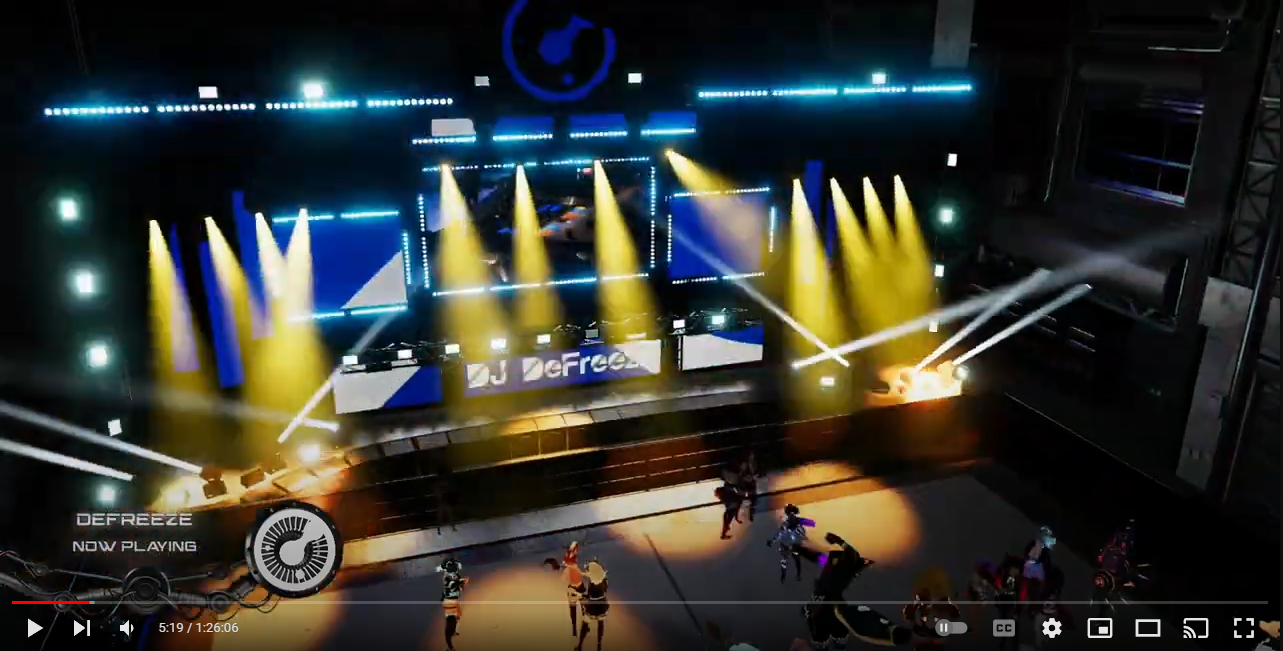
SEE ALL THESE SYSTEMS LIVE IN VRCHAT @ CLUB ORION
CHECK OUT AN EXAMPLE ORION MUSIC FESTIVAL’S IMPLEMENTATION OF VRSL (Click the image below)!:
IMPORTANT
- These systems are designed for world building on VRChat for PC. While some of the shaders in theory could be used on avatars, they are primarily designed to be placed in a PC world.
- This system is still a work in progress and is planned for long-term support as more VRChat features are released. Planned features include OSC support and Quest-Ready alternatives.
- For proper documentation, please refer to the github wiki.
Setup
Requirements
- Unity 2019.4
- VRChat SDK3 for Worlds
- UdonSharp
- USharp Video Player
- PostProcessing Stack V2 (Unity Package Manager)
- AudioLink v2.7+ (Full)
- Recommended: Open Broadcast Software (or streaming software of your choice)
- Recommended: VRSL Grid Node (For DMX control)
- Recommended: At least one extra screen that can support 16:9 resolutions.
Installation
See the Project Setup page on the wiki.
About VRSL

DMX Via Video Artnet Gridnode

What powers VRSL is the ability to transmit DMX data contained within a video stream. It is done this way as it is the best way to achieve the following goals:
- Having all players within their own instances of a world be synced.
- Allowing a given world to display data that any given user wishes.
- Allowing for live performances.
This is the main system this project was based on. Once in unity, VRSL can convert data it reads from a VRChat Player video into DMX data that the lighting system can read.
This system is powered 95% by shaders, including the actual method of reading the pixels from the screen. The other 5% is to enable GPU instancing for the shaders and certain properties. There is also basic “RAW” Udon support for when DMX Support is disabled for these shaders.
This repository comes with an example recorded video in an example scene of the lights in action as well as the grid system they’re reacting to. The video is placed in an example scene where the same lights are set-up to re-react to the video in real time, mimicing the actions of the lights shown in the example video.
Get the Artnet Gridnode
While VRSL’s lights and shaders are open source, Artnet Grid Node is not.
However, there is an open source alternative called HNode that you can find here!
Purchasing a copy of the VR Stage Lighting Grid Node will help in the development of both the node grid and the VRSL framework!
OSC and MIDI output is also included with this grid system for when VRChat officially supports it via Udon.
You can purchase a copy here, and your support will be greatly appreciated! <3
It is not required for use with AudioLink.
Local UI Panel
A UI panel that can control the intensity of the different lighting shaders is also included. Plop this panel in your world to allow users to locally control the brightness of each aspect of the lights, or all lights at once. It also includes a slider for bloom intensity and a pre-made post processing volume for it.
Audio Reaction via AudioLink
A varation of these shaders support AudioLink by llealloo.
These shaders will have their intensity’s react to the audio at different frequencies. They use the shader implementation of AudioLink for minimal overhead. There is also basic “RAW” Udon support that is enabled alongside AudioLink which inclues GPU Instanced properties and mover target following.
An example scene is included that show the different light types reacting to the different frequency bands of audio.
You can get Audiolink as well as learn more about it here!
Limitations
- This system requires using a livestream, meaning there will be some unavoidable latency for realtime setups.
- Compression artifacting can cause movement data to be scrambled a bit. VRSL works to compensate for the scrambling somewhat, but does make the movement much slower.
- Light fixtures have the ability to set to control the smoothing intensity, but it is recommended to keep the smoothing at maximum (which is 0) for most situations.
- If quicker movement is needed, it is recommended to do it in small bursts, quickly returning the smoothing back to maximum when you can.

Wiki
More information about VRSL and many helpful tutorials can be found on this repo’s wiki.
Support
If you’d like to support the project, you can do so via patreon, where you can also get some VRSL exclusives!~
You can also join the official VRSL discord!


评论